rich:orderingList lets you arrange values by moving them up or down. It’s based on a data table component, so you can put any object inside with any number of “columns” or attributes shown.
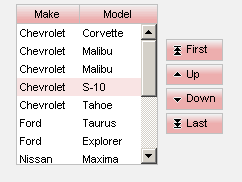
Code:
<rich:orderingList value="#{carsBean.allCars}" var="car"
  converter="carConverter">
	<rich:column>
		<h:facet name="header">Make</f:facet>
		<h:outputText value="#{car.make}"/>
	</rich:column>
	<rich:column>
		<f:facet name="header">Model</f:facet>
		<h:outputText value="#{car.model}"/>
	</rich:column>
</rich:orderingList>
The other component is rich:listShuffle. Notice that you can also order the values (move up/down) as in rich:orderingList
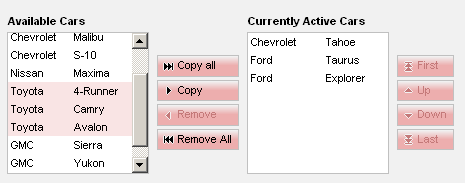
Code:
<rich:listShuttle sourceValue="#{carsBean.allCars}"
       targetValue="#{carsBean.selectedCars}"
       var="car"
       listsHeigth=300
       sourceListWidth="300"
       targetListWidth="300"
       sourceCaptionLabel="Available Cars"
       targetCaptionLabel="Currently Active Cars"
       converter="carConverter">
	<rich:column>
		<h:outputText value="#{car.make}"/>
	</rich:column>
	<rich:column>
		<h:outputText value="#{car.model}"/>
	</rich:column>
</rich:listShuttle>
If you know how to use h:dataTable, you should be able to use these components easily, without even referring to the developer guide.
One thing to keep in mind is that if you are using objects other than String (or primitives), you need to write a custom converter to convert the values from text to custom object type. You also have to overwrite the equal() method in your custom object. Here is how mine looks for the above examples:
@Override
public boolean equals(Object obj) {
    CarItem ci = (CarItem)obj;
    if ( this.make.equals(ci.getMake()) &&
         this.model.equals(ci.getModel()))
    	return true;
    else
    	return false;
}


 Max Katz
Leave a comment