There is more than one way to delete a row from data UI component in JSF. If you use RichFaces and Seam, there even more ways.
All the cases will use the following setup:
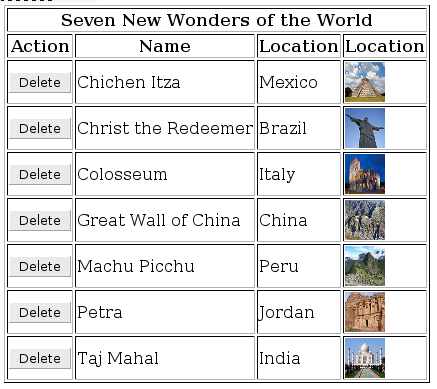
JSF view:
      Seven New Wonders of the World

         Action


         Name


         Location


         Location
WonderService.java:
public class WonderService {

   private ArrayList  list;
   public ArrayList getList() {
	return list;
   }
   @PostConstruct
   public void init () {
		list = new ArrayList ();
		list.add(new Wonder("Chichen Itza", "Mexico", "http://upload.wikimedia.org/wikipedia/commons/thumb/7/7a/Chichen-Itza-Castillo-Seen-From-East.JPG/90px-Chichen-Itza-Castillo-Seen-From-East.JPG"));
		list.add(new Wonder("Christ the Redeemer", "Brazil", "http://upload.wikimedia.org/wikipedia/commons/thumb/5/50/CorcovadofotoRJ.jpg/90px-CorcovadofotoRJ.jpg"));
		list.add(new Wonder("Colosseum", "Italy", "http://upload.wikimedia.org/wikipedia/commons/thumb/5/53/Colosseum_in_Rome%2C_Italy_-_April_2007.jpg/90px-Colosseum_in_Rome%2C_Italy_-_April_2007.jpg"));
		list.add(new Wonder("Great Wall of China", "China", "http://upload.wikimedia.org/wikipedia/commons/thumb/1/16/GreatWallNearBeijingWinter.jpg/90px-GreatWallNearBeijingWinter.jpg"));
		list.add(new Wonder("Machu Picchu", "Peru", "http://upload.wikimedia.org/wikipedia/commons/thumb/1/13/Before_Machu_Picchu.jpg/90px-Before_Machu_Picchu.jpg"));
		list.add(new Wonder("Petra", "Jordan", "http://upload.wikimedia.org/wikipedia/commons/thumb/0/06/PetraMonastery.JPG/90px-PetraMonastery.JPG"));
		list.add(new Wonder("Taj Mahal", "India", "http://upload.wikimedia.org/wikipedia/commons/thumb/c/c8/Taj_Mahal_in_March_2004.jpg/90px-Taj_Mahal_in_March_2004.jpg"));
   }
   public WonderService() {}
}
Wonder.java
public class Wonder{

   private String name; // setter and getter
   private String location; // setter and getter
   private String imageUrl; // setter and getter

   public Wonder(String name, String location, String imageUrl) {
	super();
	this.name = name;
	this.location = location;
	this.imageUrl = imageUrl;
   }
}
WonderBean.java
public class WonderBean {

   private WonderService service;

   public WonderService getService() {
	return service;
   }
   public void setService(WonderService service) {
	this.service = service;
   }
   public WonderBean() {
	super();
   }
   public ArrayList getWonders() {
	return service.getList();
   }
}
All the code changes are done in WonderBean.java.
JSF
If you are only using plain JSF, one way is to bind to component instance
private UIData table; // getter and setter
   Seven New Wonders of the World

      Action


   ...
Let’s create delete() method:
public void delete() {
  service.getList().remove(table.getRowData());
}
Using UIData.getRowData() method we can retrieve the row data the corresponds to raw clicked in the browser. JSF is smart to wire everything for us automatically.
Instead of using getRowData(), it’s also possible to use getRowIndex() method:
public void delete() {
  service.getList().remove(table.getRowIndex());
}
We can also use f:setPropertyActionListener to help us set the row we want to delete.
private Wonder selected; // setter and getter
   Seven New Wonders of the World

    Action


    ...
setPropertyActionListener takes the current row object #{wonder} and assigns it to #{wonderBean.wonder}.
One more option is to use data modal class such as ListDataModal, bind it directly to the UI component and then wrap the list. Being a more exotic option, I will skip it in this post.
RichFaces
If you are using RichFaces, you get a few more options. Of course you can use everything you saw above.
With rich:dataTable you get access to row key defined by rowKeyVar attribute. We can use this attribute as the index of the row we want to delete.
   Seven New Wonders of the World

      Action


   ...
private int wonderIndex; // getter and setter

public void delete() {
   service.getList().remove(wonderIndex);
}
Using rich:dataTable with ruby skin:

Keeping everything the same in the bean, instead of using f:setPropertyActionListener, it’s possible to use a4j:actionparam:
a4j:actionparam works like f:param but in addition automatically assigns the value (in our case #{row}) to assignTo property (in our case #{wonderBean.wonderIndex}). One thing to remember is that a4j:actionparam renders a request parameter on to the page. If you are trying to pass in a custom object, you need to write a converter.
Seam
Seam makes deleting even simpler. We can use two annotations that will inject the selected data row into a Seam component.
@DataModel private List wonderList; @DataModelSelection private Wonder wonder; ...Seven New Wonders of the World Action ...@DataModelSelection will inject the actual row data which was clicked. Or we can @DataModelSelectionIndex which will inject the row index:
@DataModelSelectionIndex private Integer wonderIndex;No changes in the page.


 Max Katz
Leave a comment