This short tutorial shows you how to get started with JavaFX and Exadel JavaFX Studio plug-in for Eclipse. You will build an application where you can add users to a list and delete users from a list.
What you need
- Download and install JavaFX SKD for your operating system (download)
- Download and install Eclipse 3.4.2 – Eclipse IDE or Eclipse IDE for Java EE Developers (download)
- Download and install Exadel JavaFX Studio plug-in (download, click on Download, left-side bar). Installation steps
Creating JavaFX project
- In Eclipse, select File/New/Other…/JavaFX/JavaFX Project
- Click Next
- For Project name enter: javafx-users
- On the same screen, click Configure to configure JavaFX SDK
- Click Add
- Point to JavaFX SDK home via Browse…
- Click Finish and then OK to go back to new project wizard
- Click Finish to finish project creation
Creating JavaFX script
- Right-click src folder and select New/Package
- For name, enter: example and click Finish
- Right-click example and select New/Other/JavaFX/JavaFX Script. Click Next
- For name, enter: users. Click Next
- Check Generate Stage. Click Finish. This steps adds a small JavaFX application that you can run.
- Right click in editor whitespace and select Run As/JavaFX Application. You should see a small window open with Hello World message.
Creating users application
Copy and paste the following JavaFX script over the existing code replacing everything but the package name:
package example;

import javafx.scene.Scene;
import javafx.scene.text.Font;
import javafx.scene.text.Text;
import javafx.scene.control.TextBox;
import javafx.scene.control.Button;
import javafx.scene.layout.HBox;
import javafx.scene.layout.VBox;
import javafx.scene.layout.Tile;
import javafx.geometry.HPos;
import javafx.geometry.VPos;
import javafx.stage.Stage;

var names : String [];
var textBox : TextBox = TextBox {
        columns: 15
}
Stage {
    title: "Application"
    width: 250 height:350
    scene: Scene {
        content: [
               HBox {
                  layoutX: 3
                  layoutY: 3
                  spacing: 3
                  content: [
                     textBox,
                     Button {
                        text: "Add"
                        style: "base: blue"
                        action: function () {
                           insert textBox.text into names;
                        }
                     }
                  ]
               }
               VBox {
                  layoutX: 3
                  layoutY: 30
                  spacing: 2
                  content: [
                     Tile {
                        columns: 2
                        content: bind for (name in names) { [
                           Text {
                              font: Font { size: 16 }
                              content: name
                           },
                           Button {
                              text: "Delete"
                              style: "base: blue"
                              action: function () {
                                 delete names[indexof name];
                              }
                           }
                        ]
                     }
                  }
              ]
           }
        ]
    }
};
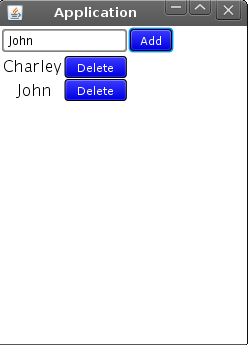
To run, right-click in the editor and select Run As/JavaFX Application. You should get the following:
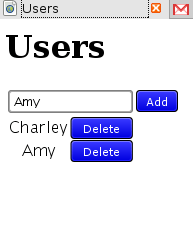
You can also run as Applet by selecting Run As/JavaFX Application (Applet).

 Max Katz
Leave a comment