This post covers starting/stopping Seam conversations from JavaFX. See other posts in this series:
Calling Seam component from JavaFX
Invoking Hibernate Validator from JavaFX
Binding to server-side context variable from JavaFX
Using Expression Language (EL) in JavaFX to communicate with server
Server side
Seam component:
@Name ("wizard")
@Scope (ScopeType.CONVERSATION)
public class Wizard {
   @In Conversation conversation;

   public String info (){
	return "Id: "+conversation.getId() +", active: "+conversation.isLongRunning();
   }
   @Begin
   public void start (){
	// do something
   }
   @Conversational
   public String nextStep (){
	return "Id: "+conversation.getId() +", active: "+conversation.isLongRunning();
   }
   @End
   public void end (){
       // do something
   }
}
Above is a pretty simple Seam component with conversation scope. It has method to start the conversation (@Begin) and end the conversation (@End). It also has nextStep() annotated with @Conversation, that means that the method can only be invoked within a long running conversation.
Client side
Component interface:
public interface Wizard {
   public void end();
   public void start();
   public String nextStep ();
   public String info ();
}
JavaFX script:
CookieHandler.setDefault(new CookieManager(null, CookiePolicy.ACCEPT_ALL));
FXServiceFactory.URL = "http://localhost:8080/server-javafx/seam/resource/hessian/";
var wizardService = WizardServiceFactory.getWizardService();

def red: RadialGradient = RadialGradient{
    centerX: 8, centerY: 8, radius: 12, proportional: false
    stops: [
    Stop {offset: 0.0 color: Color.WHITE},
    Stop {offset: 1.0 color: Color.RED}
    ]
}
def green: RadialGradient = RadialGradient{
    centerX: 8, centerY: 8, radius: 12, proportional: false
    stops: [
    Stop {offset: 0.0 color: Color.WHITE},
    Stop {offset: 1.0 color: Color.GREEN}
    ]
}
var light = Circle {
    centerX: 10 centerY: 10 radius: 10 stroke: Color.BLACK
    fill: bind if (longRunning) green else red
}
var infoButton:Button = Button {
    text : "Info"
    style : "-fx-font-size: x-large"
    action: function () {
        var newInfo = wizardService.info();
        insert newInfo into info;
    }
}
var longRunningOnly:Button = Button {
    text : "Only if active"
    style : "-fx-font-size: x-large"
    action: function () {
        try {
            var newInfo = wizardService.nextStep();
            insert newInfo into info;
        }
        catch (exception: Exception) {
            Alert.inform("Not active conversation");
        }
    }
}
var longRunning = false;
var convButton:Button = Button {
    style : "-fx-font-size: x-large"
    text : bind
    if (longRunning) "Stop" else "Start"
    action: function () {
        if (longRunning==false){
            wizardService.start();
            longRunning = true;
            var newInfo = wizardService.info();
            insert newInfo into info;
        }
        else if (longRunning==true) {
            wizardService.end();
            longRunning = false;
            var newInfo = wizardService.info();
            insert newInfo into info;
        }
    }
}
var info = [wizardService.info()];
var list:VBox = VBox {
    content: {
        VBox {
            content :  bind for (item in info){
                Text {
                    content: item
                    style : "-fx-font-size: x-large"
                }
            }
        }
    }
}
Stage {
    title: "Application"
    width: 450 height: 400
    scene: Scene {
        fill: LinearGradient {
            endX: 0.0
            stops: [Stop { offset: 0.0 color: Color.LIGHTGRAY }
            Stop { offset: 1.0 color: Color.GRAY }]
        }
        content: [
        VBox {
            spacing : 4
            content: [
            HBox {
                spacing: 4
                content: [
                infoButton, convButton, light, longRunningOnly
                ]
            },
            list
            ]
        }
        ]
    }
};
Line 3: we get reference to WizardService and now can call all methods in the interface.
Lines 23-30: info button which returns the current conversation status
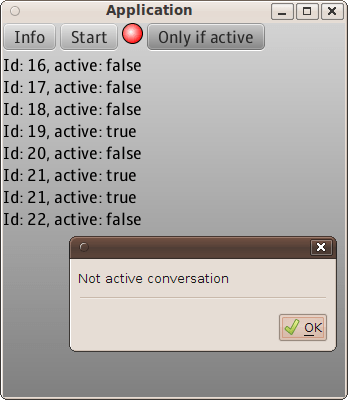
Lines 31-43: button that calls a method which should be called only when a long running conversation is active. If clicked outside of a long running conversation, an error dialog will be shown
Lines 45-63: button that starts/stops the conversation
Notice that nothing special needs to be done when using conversations, it is just a simple component method invocation.
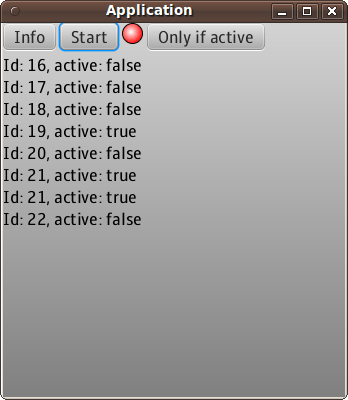
No long running conversation:
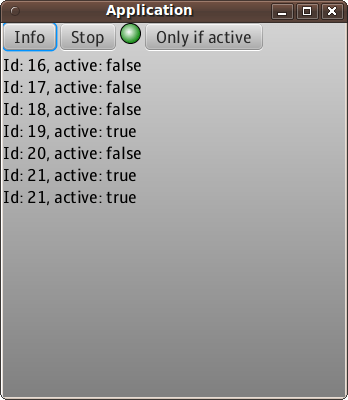
Long running conversation:
Trying to invoke a method with @Conversation outside of a long running conversation:
That’s it.
 Max Katz
Leave a comment