Sorting data in a table is a common task. Luckily, RichFaces comes out-of-the-box with basic sorting. To make it a little bit more interesting I will use 7 New Wonders of the World data from Wikipedia instead of plain User or Account data. All images are linked from Wikipedia as well.
In this post I will show in-table sorting or by clicking the column header. In the next post I will show how to sort via external controls (buttons outside the table).
First, here is my managed bean:
package wonder;

import java.util.ArrayList;
import javax.annotation.PostConstruct;

public class NewWondersBean {

   private ArrayList  sevenNewWonders = new ArrayList ();

   @PostConstruct
   public void init () {
	sevenNewWonders = new ArrayList ();
	sevenNewWonders.add(new Wonder("Chichen Itza", "Mexico", "http://upload.wikimedia.org/wikipedia/commons/thumb/7/7a/Chichen-Itza-Castillo-Seen-From-East.JPG/90px-Chichen-Itza-Castillo-Seen-From-East.JPG"));
	sevenNewWonders.add(new Wonder("Christ the Redeemer", "Brazil", "http://upload.wikimedia.org/wikipedia/commons/thumb/5/50/CorcovadofotoRJ.jpg/90px-CorcovadofotoRJ.jpg"));
	sevenNewWonders.add(new Wonder("Colosseum", "Italy", "http://upload.wikimedia.org/wikipedia/commons/thumb/5/53/Colosseum_in_Rome%2C_Italy_-_April_2007.jpg/90px-Colosseum_in_Rome%2C_Italy_-_April_2007.jpg"));
	sevenNewWonders.add(new Wonder("Great Wall of China", "China", "http://upload.wikimedia.org/wikipedia/commons/thumb/1/16/GreatWallNearBeijingWinter.jpg/90px-GreatWallNearBeijingWinter.jpg"));
	sevenNewWonders.add(new Wonder("Machu Picchu", "Peru", "http://upload.wikimedia.org/wikipedia/commons/thumb/1/13/Before_Machu_Picchu.jpg/90px-Before_Machu_Picchu.jpg"));
	sevenNewWonders.add(new Wonder("Petra", "Jordan", "http://upload.wikimedia.org/wikipedia/commons/thumb/0/06/PetraMonastery.JPG/90px-PetraMonastery.JPG"));
	sevenNewWonders.add(new Wonder("Taj Mahal", "India", "http://upload.wikimedia.org/wikipedia/commons/thumb/c/c8/Taj_Mahal_in_March_2004.jpg/90px-Taj_Mahal_in_March_2004.jpg"));
	}

   public ArrayList  getSevenNewWonders() {
	return sevenNewWonders;
   }
}
Wonder class has three properties, all strings (name, location, imageUrl).
This is how the JSF page looks:
         Name


         Location


         Image
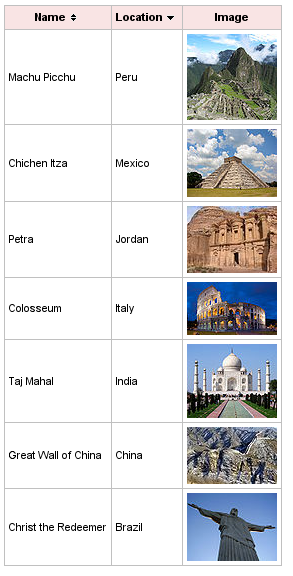
To get the sorting working, all you need to do is specify sortBy attribute on rich:column. sortBy is an expression that points to a property in the bean to be sorted by. That’s it. Here is how it looks. Notice the arrows (up/down) in the header. You click them to sort.


 Max Katz
Leave a reply to RichFaces sorting and filtering – complete edition | Maxa Blog Cancel reply