With release of Java EE 6, you can now use Bean Validation with JSF 2. If you are using JSF 1.2 (and that’s probably still most of you), you can use Seam to take advantage of Hibernate Validator. If you are not using Seam but would still like to use Hibernate Validator, RichFaces provides such functionality.
There are three tags in RichFaces which let you work with Hibernate Validator annotations:
- rich:beanValidator
- rich:ajaxValidator
- rich:graphValidator
Let’s take this bean as an example. I’m only using three simple annotations, but you can use everything Hibernate Validator offers.
public class Bean {
   @Length(min=3, max=15,
       message="Invalid text length; must be between {min} and {max}")
   private String text;

   @Range(min=0, max=25)
   private Integer items;

   @Email
   private String email;
}
rich:beanValidator
Using the bean above, we add rich:beanValidator to each input component to validate against constraints in the model defined by Hibernate Validator annotations:
When running it should look like this:
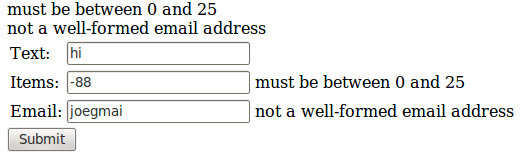
To add Ajax validation such as invoke validation when onblur event occurs, we can add a4j:support tag to each field (just one shown here):
That’s looks like too much work, first we need to add a4j:beanValidator and then a4j:support to each component. There a simpler way to do the same.
rich:ajaxValidator
rich:ajaxValidator is a combination of rich:beanValidator and a4j:support. Taking above example adding Ajax validation to each component we use rich:ajaxValidator and specify the event via event attribute:
When onblur event occurs, Ajax request will be fired and component value will be validated. rich:ajaxValidator tag has a number of features turned on by default:
- It is ajaxSingle=”true”. This means that only this component will be processed (executed) on the server
- It is bypassUpdates=”true”. This means that even if the component value is valid, after Process Validation phase it will go to Render Response. This makes sense as we don’t really need to Update Model when only validating
- We don’t have to rerender the messages tag because we are using rich:message and rich:messages. These tags are smart enough to figure out which component was validated and which error message to update and which to keep unchanged. If you want to learn why h:message need to be rerendered, read RichFaces region – partial JSF tree processing post
You can also use rich:ajaxValidator with standard JSF validators (this assuming you don’t have Hibernate Validator annotations in the bean):
If you have used Seam’s s:validate tag, then you might have seen this note in Seam’s documentation for JSF validation:
Note: specifying @NotNull on the model does not eliminate the requirement for required=”true” to appear on the control! This is due to a limitation of the JSF validation architecture.
This has to do with JSF not processing the component if no value was submitted
RichFaces takes this into account so you don’t have to set required=”true”. To check for empty value, use @NotEmpty annotation. Using @NotNull won’t work because the value passed is not null, but an empty string.
@NotEmpty
private String text;
rich:graphValidator
If you have a large form, adding rich:ajaxValidator to each one might be tedious. Instead, wrap any number of components inside rich:graphValidator and rich:beanValidator will be automatically added to each input component (similar to s:validateAll in Seam). For example:
rich:graphValidator will only add rich:beanValidator tag, this means that a button/link need to be clicked to submit the form. In order to have Ajax validator, rich:ajaxValidator (or a4j:support) would still need to be added to each component. For example:
rich:graphValidator comes with one more useful feature. It can validate the bean once all the values have been set. This is handy if you need to sum to properties and make sure the sum is of certain value. Let’s say we have this bean:
public class TotalBean  {
   @Range(min=3, max=25, message="Items must be between {min} and {max}")
   private Integer items=1;

   @Range(min=3, max=100, message="Parts must be between {min} and {max}")
   private Integer parts=1;

   @Min(value=10, message="Items and parts total must be greater than {value}")
   public Integer getTotal (){
	return (this.items + this.parts);
   }
}
and then this JSF page:
When Submit is clicked, the form will be validated in the standard way. Notice that rich:graphValidator has value attribute bound to the bean itself #{totalBean}. This tells RichFaces to validate the whole bean again after Update Model phase. The individual properties will be validated but already hold valid values (as we passed Process Validations phase). During this step, we also going to validate getTotal(). It wasn’t validated when form was submitted as it wasn’t bound to any page components. When getTotal() is validated, we are going to make sure that the sum of parts and items is at least 10.
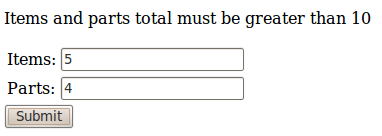
In the image above, individual fields passed validation, but when the whole bean was validated, getTotal() failed because the sum of items and parts is less then 10.


 Max Katz

Leave a reply to w0lfshad3 Cancel reply