It’s end of the day Friday (and end of they year), what’s a better time than to revisit one of the original RichFaces components: rich:suggestionbox. rich:suggestionbox shows a list of values in a pop-up based on the input provided. It has an action method that takes value from an input field. In that action, you write what values to return based the input provided. The list of values returned is then shown in a pop-up. The actual suggestion box is just the pop-up, it needs to be attached to an input field.
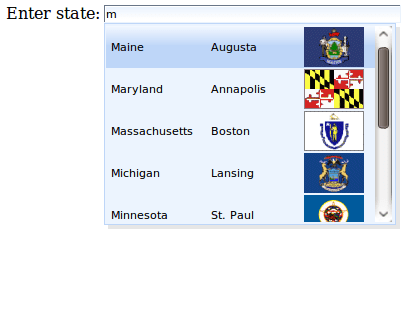
JSF page:
As you can see above, suggestion box works just like a data table in JSF. This allows to display any number of columns, including rich content such as images. Also, for attribute is used to attached suggestion box to input field.
This is how suggest action looks inside stateBean:
public ArrayList suggest(Object input) {
   String userInput = (String) input;
   ArrayList ret = new ArrayList();

   for (State state : this.states) {
      if ((state.getName().toLowerCase()).startsWith(userInput.toLowerCase())) {
         ret.add(state);
      }
   }
   return ret;
}
input is what user entered in the browser. Use this value to filter states and return to the client to be shown inside a pop-up.
Let’s say that you need to enter the state capital into the input field instead of state. By default, the first column is the value inserted. You could move the capital column to be first but that’s not the best approach. Instead, use fetchValue attribute to specify which of the column values to set into the input field:
...
As the pop-up data is retrieved from the server, you might want the user to enter some minimum number of characters before sending a request to the server. To do that set minChars attribute:
...
There is also a client-side suggestion box called rich:comboBox.
If the suggestion box is inside a form, most likely you only want to process this component on the server. You don’t really care to process and validate any other components inside the form. In such case, use ajaxSingle=”true” on rich:suggestionbox or nest the component inside a4j:region tag as shown here:
...
If you are also updating anything based on value selected, you can limit updates to this region by setting renderRegionOnly=”true”. More on regions and this attribute in this post.


 Max Katz
Leave a reply to Derk Cancel reply