- Okta Workflow guides
- What is the Reduce card?
- Creating a list and calling the Reduce card
- Helper flow to process (reduce) each list item
- Additional guide resources
- What you learned
- Workflows resources
Okta Workflow guides
Okta Workflows guides are questions and answers from the community office hours, the #okta-workflows channel on MacAdmins Slack and other places. Read all the other how-to guides.
How to reduce a list to a single value?
You have a list of values. You must combine them into a single value (a text or a sum) to include in an email or a Slack message. You can use the Reduce card to achieve that.
What is the Reduce card?
The Reduce card takes a list of values and reduces them to a single value.
You have a list of text values:
- Milk
- Bread
- Butter
- Eggs
- Cheese
You need a single text value consisting of all the values from the list:
> Groceries:
* Milk
* Bread
* Butter
* Eggs
* Cheese
You need to reduce the list into a single value.
The solution has two flows:
- The main flow that creates the list and calls the Reduce card
- A helper flow that concatenates each text
Creating a list and calling the Reduce card
The main flow creates the list and calls the Reduce card:
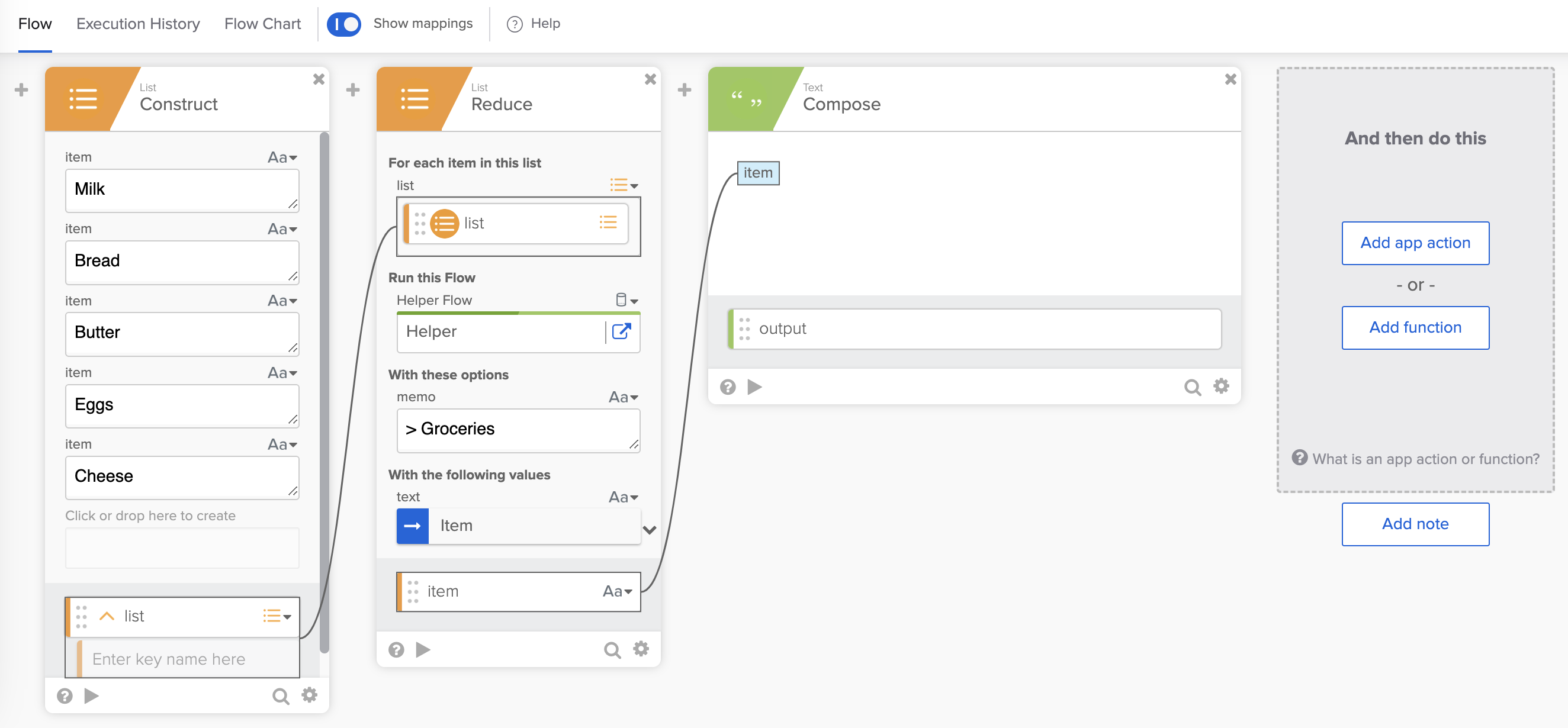
- The List – Construct card creates the list.
- The List – Reduce card takes the list and runs the Helper helper flow on each item.
- memo has initial value of > Groceries.
- Values from the list will be added to the initial value.
- Item is each item value from the list
- In the output section, item holds the reduced value after all the items are processed.
- The Text – Compose card displays the reduced value.
Note: memo field type (Text) needs to match the card’s output item field type (Text).
Helper flow to process (reduce) each list item
This is the helper flow:

The helper flow runs for each item in the list.
First run
On the first run, the memo value is:
> Groceriesand
* Milkis appended to it.
The helper flow returns:
> Groceries
* Milk
Second run
On the second run, the memo value is:
> Groceries
* Milk
and
* Breadis appended to it.
The helper flow returns:
> Groceries
* Milk
* Break
Third run
On the third run, the memo value is:
> Groceries
* Milk
* Break
and
* Butteris appended to it.
The helper flow returns:
> Groceries
* Milk
* Break
* Butter
Fourth run
On the fourth run, the memo value is:
> Groceries
* Milk
* Break
* Butter
and
* Eggsis appended to it.
The helper flow returns:
> Groceries
* Milk
* Break
* Butter
* Eggs
Fifth run
On the fifth run, the memo value is:
> Groceries
* Milk
* Break
* Butter
* Eggs
and
* Cheeseis appended to it.
The helper flow returns:
> Groceries
* Milk
* Break
* Butter
* Eggs
* Cheese
Since cheese is the last item, the Reduce card completes processing.
The last helper flow run:

This is the final result. A list of items is reduced to a single text value:
> Groceries
* Milk
* Break
* Butter
* Eggs
* Cheese
Additional guide resources
Additional resources about how to use the Reduce card:
- Learn the Differences Between Three Workflows List Functions: For Each, Map, and Reduce (guide, video).
- How to Reduce a List to a Single Value, 3 Examples Using List-Reduce Workflows Card (guide, video).
What you learned
This guide taught you how to use the Okta Workflows Reduce card to reduce a list to a single value.
Workflows resources
🍫 Get help from Workflows specialists during weekly community office hours.
📺 Learn from Workflows videos.
🛟 Get help from support: discuss a Workflows topic or ask a question.
🙋🏻♀️ Join the #okta-workflows channel on MacAdmins Slack to learn and get help from the community.
 Max Katz
Leave a comment