In this guide:
Okta Workflows guides
Okta Workflows guides are questions and answers from the community office hours, the #okta-workflows channel on MacAdmins Slack, and other places. Read all the other guides.
How to identify users whose status changed x number of days since today?
Identifying users
For example, you need to find users de-provisioned 30 days ago. The following flow finds such users:
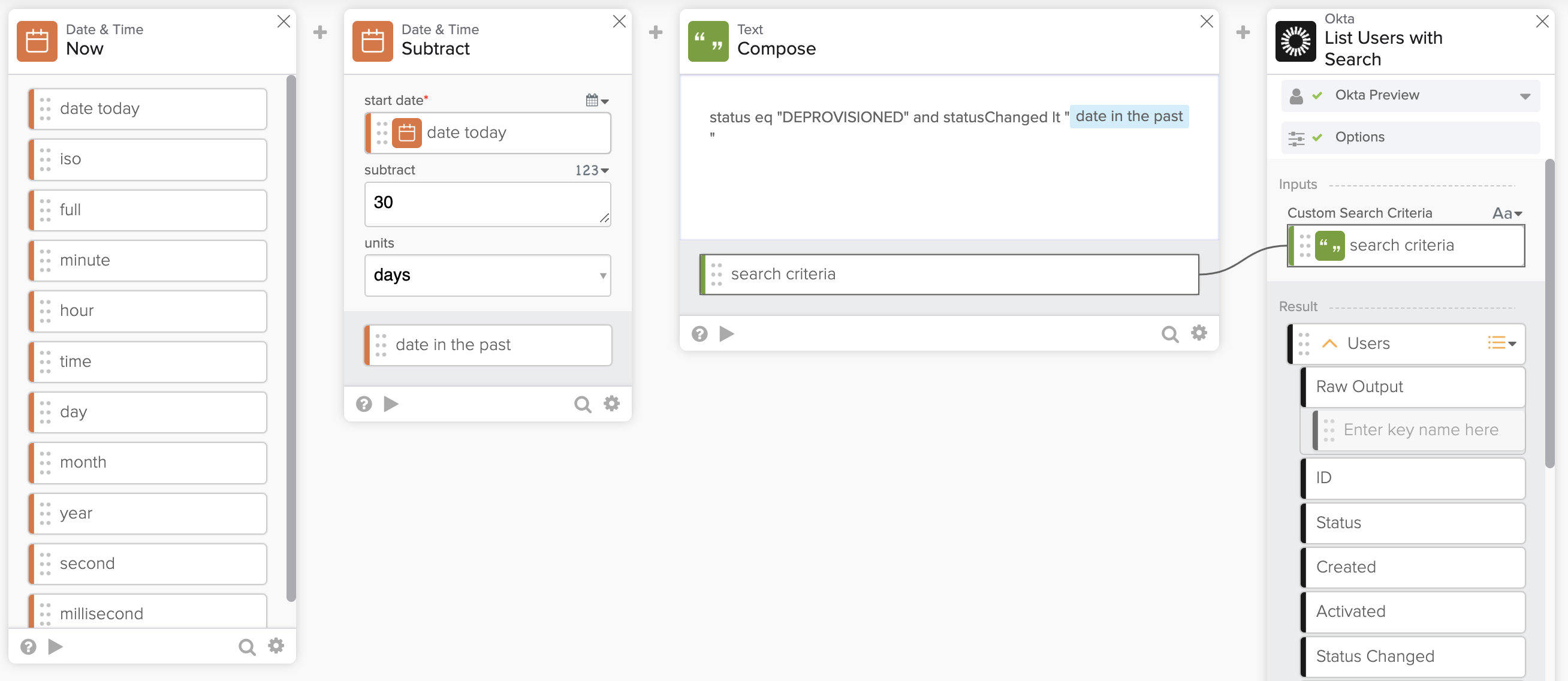
The flow has the following cards:
- The Date & Time – Now card returns today’s date.
- The Date & Time – Subtract card subtracts x number of days from today’s date. For example, you need to find users whose status changed 30 or more days ago.
- The Text – Compose card creates the search query
- The status is set to DEVPROVISIONED. You can use another status.
- The statusChanged is the last time the status changed.
- The statusChanged date is checked if it happened 30 days ago. You can use another number of days.
- The Okta – List User with Search card uses the query to find the users who were de-provisioned 30 days ago.
Identifying inactive Okta user template
A related solution is available in the Identify inactive Okta users’ template. This template searches for all users in an Okta tenant whose last login date was before a specific date.
Workflows resources
🍫 Get help from Workflows specialists during weekly community office hours.
📺 Learn from Workflows videos.
🛟 Get help from support: discuss a Workflows topic or ask a question.
🙋🏻♀️ Get help from the community: join the #okta-workflows channel on MacAdmins Slack.


 Max Katz
Leave a comment