In this guide:
Okta Workflows guides
Okta Workflows guides are questions and answers from the community office hours, the #okta-workflows channel on MacAdmins Slack, and other places. Read all the other guides.
How do pause a flow and resume running at a specific date and time in Workflows?
This guide will teach you to pause and resume a flow on a specific date and time in Okta Workflows.
Pause and resume a flow at a specific time
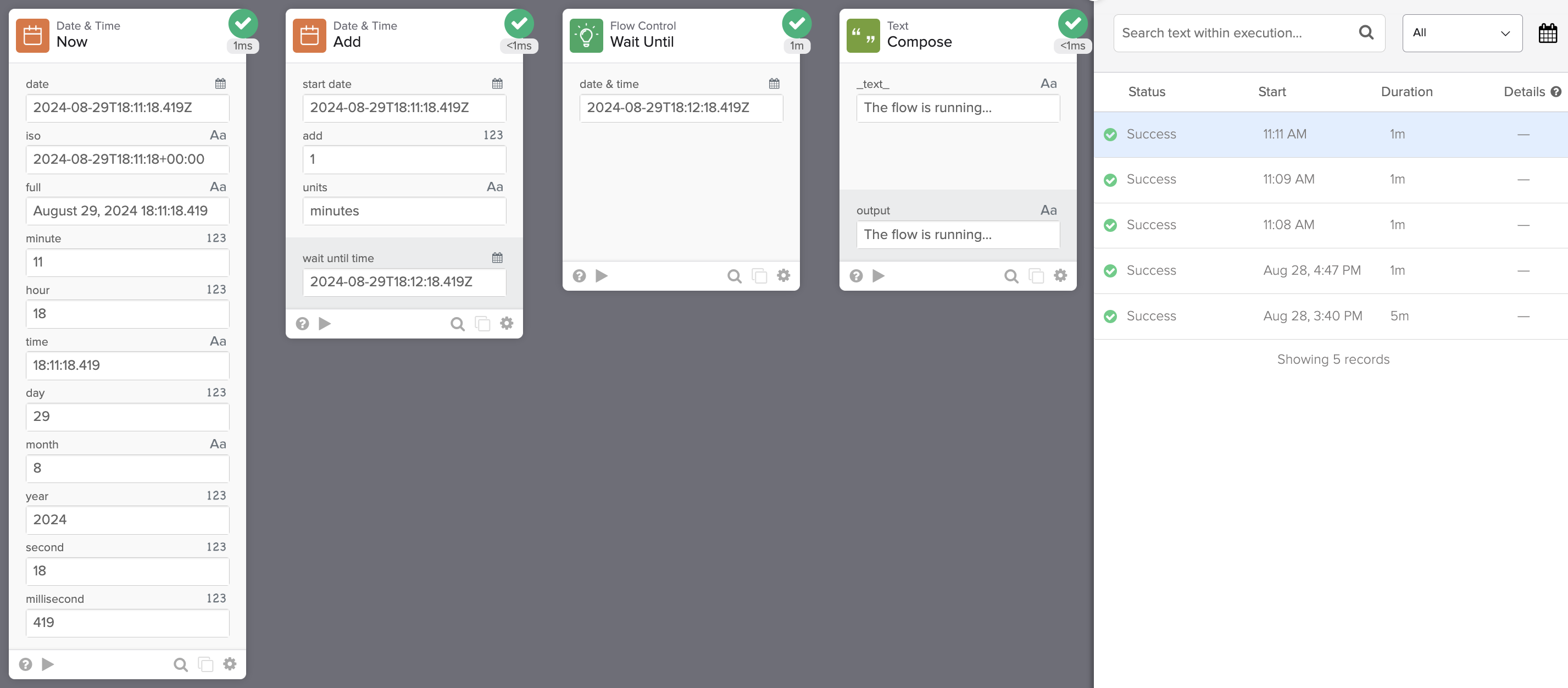
The following flow pauses for one minute and then resumes running.

Flow steps
The flow has the following steps.
Get current time
The Date & Time – Now card returns the current date and time.
Time to resume the flow
The Date & Time – Add card calculates when to resume the flow. The card adds time to the current time. The card supports the following time units:
- milliseconds
- seconds
- minutes
- hours
- days weeks
- months
- years
Resume flow
The Flow Control – Wait Until card sets up the time to resume the flow.
Flow resumes running
The Text – Compose card demonstrates the flow is running.
Result
When you run the flow, it will pause for one minute. You can configure a longer period.

The flow resumes after one minute.
Okta Workflows resources
🍫 Get help from Workflows specialists during weekly community office hours.
📺 Learn from Workflows videos.
🛟 Share your flows and ask questions on the Okta Workflows community forum.
🙋🏻♀️ Get help from the community: join the #okta-workflows channel on MacAdmins Slack.
 Max Katz
Leave a comment