The following are some questions and answers from the Okta Workflows community office hours on Thursday, October 10, 2024. I edit some questions for clarity.
New to Okta Workflows
The Getting Started with Okta Workflows page has all the resources to help you get started.
Community forum
Consider posting your questions in the Okta Workflows community forum for a faster response or if there are no open spots in the next office hours session.
Office hours questions and answers
How do you extract a value from a JSON object?
We have several KB articles showing how to get values from a JSON object:
- Examples Extracting Values from a JSON Object in Workflows.
- How to Extract Key-Value Pairs from a JSON Payload with Multiple Objects in Workflows.
- How To Get Multiple Values From an API Call JSON Response in Okta Workflows.
- Access JSON Data in an API Response.
I’m new to Okta Workflows. What can I build with Workflows?
We recommend reviewing the available Workflows templates to learn what is possible. Click Templates from the Workflows home page.

Then, complete the step-by-step tutorials from the Getting Started with Okta Workflows page and review all the other resources.
How do I build an API call with pagination?
The following video shows how to build an API call with pagination:
Can we access Okta table from another app via API call?
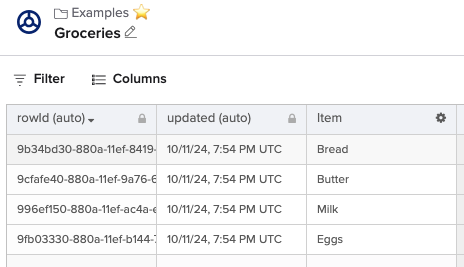
You can access a flow via an API call, and the flow can access the table. However, there is no API to access a table directly.
The following shows an example.
Workflows table:
The flow you invoke via an API call:

Running the flow returns:
{
  "Grocery List": [
    "Bread",
    "Butter",
    "Milk",
    "Eggs"
  ],
  "statusCode": 200
}
What is your advice about suing service accounts for connector connections?
Our guidance is to use service accounts whenever possible.
How do you build the following flow? Check if a group exits. If yes, add a user to the group. If the group doesn’t exist, create it and add the user to it.
The following flow shows a high-level solution:
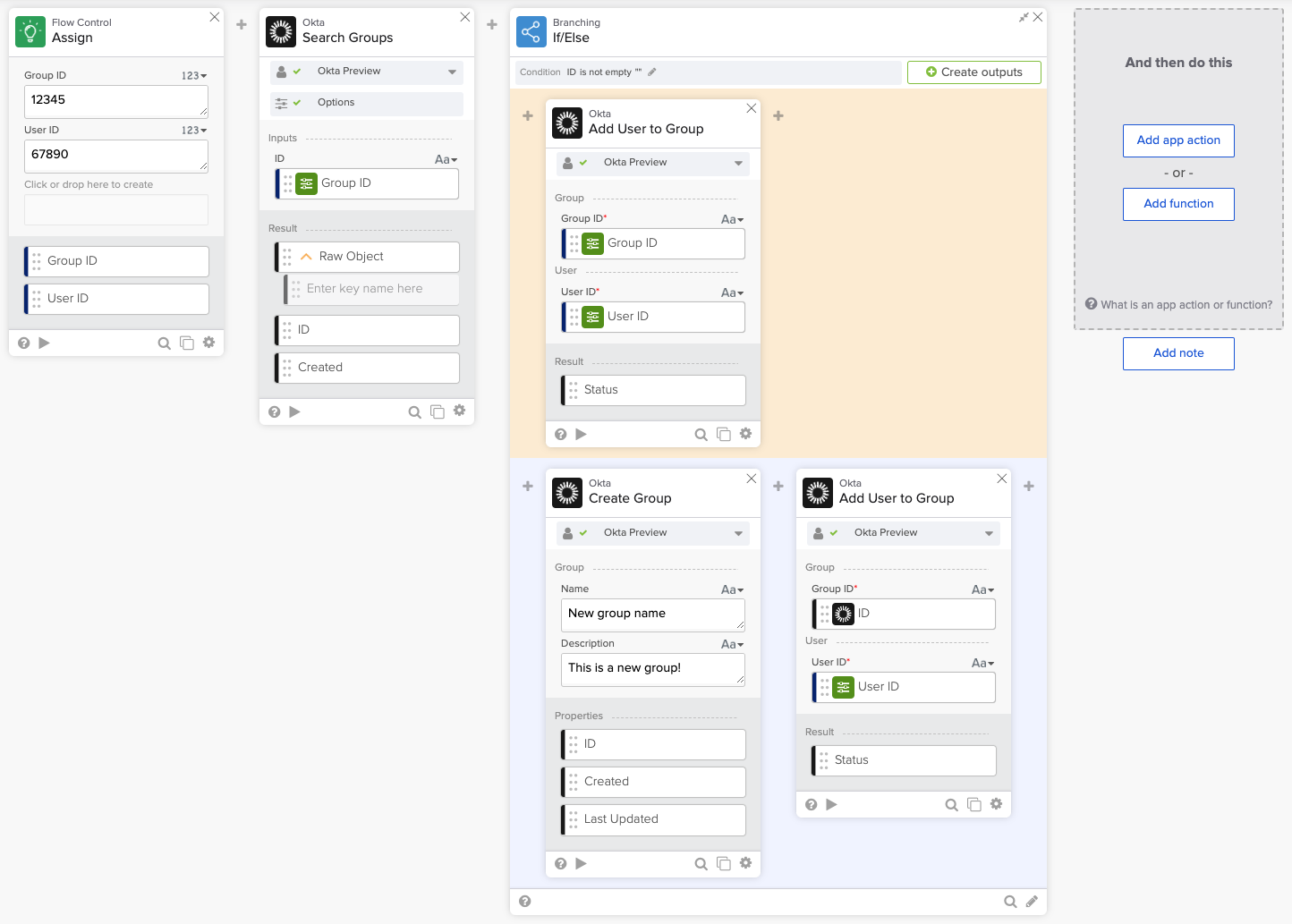
The flow starts with searching for a group.
If the group already exists, add the user to it. If it doesn’t exist, create it and add the user to it.
Okta Workflows resources
🍫 Get help from Workflows specialists during weekly community office hours.
📺 Learn from Workflows videos.
🛟 Ask questions on the Okta Workflows community forum.
🙋🏻♀️ Get help from the community: join the #okta-workflows channel on MacAdmins Slack.
 Max Katz
Leave a comment