In this guide:
- Okta Workflows guides
- Remove from app, assign to group
- Related Okta Workflows guides
- Okta Workflows resources
Okta Workflows guides
Okta Workflows guides offer questions and answers from Okta Workflows community office hours. They also come from the #okta-workflows channel on the Mac Admins Slack and other places. Read all the other guides.
How to remove a user from an app when the user is assigned to a group in Okta Workflows?
This guide teaches how to remove a user from an app when the user is assigned to a group in Okta Workflows.
Remove from app, assign to group
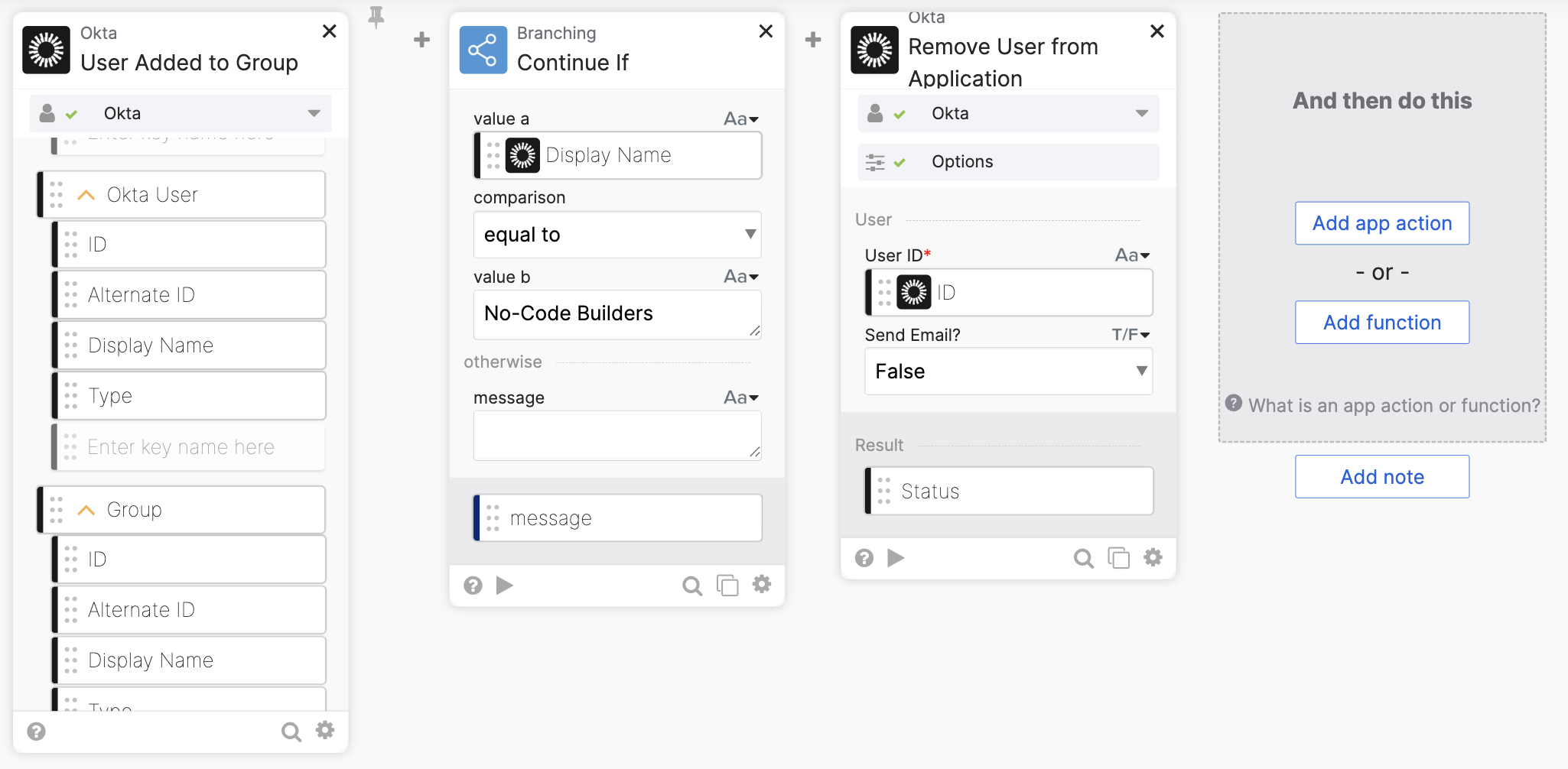
This flow runs when a user is assigned to a group. The flow then removes a user from an app assignment.
How the flow works
- The flow runs when a user is added to a group (the Okta-User Added to Group card event).
- You want to run this flow only for a particular group. The Branching-Continue If card checks the group name. The flow continues if the group is correct.
- The Okta-Remove from Application card removes the user from direct app assignment (since the application is assigned to the group).
- The Okta-Remove from Application card is configured with a particular application in the card’s Options. In this flow, the application is Salesforce.

- The Okta-Remove from Application card is configured with a particular application in the card’s Options. In this flow, the application is Salesforce.
Use an event hook
The Branching-Continue If card checks if a user has been added to the correct group, but the flow will still run whenever a user is added to any group.
Another solution is to use an event hook. An event hook (with a filter) allows you to check the group name before triggering a flow. This way the flow will run only when the group matches.
To learn about event hook filtering:

How the flow works
- The On Demand-API Endpoint card allows to invoke this flow with an API endpoint.
- The Object-Get card extracts the user ID.
- The Okta-Remove from Application card removes the user from direct app assignment.
This event hook will run when a User is added to group event fires. It invokes the API set in the Endpoint URL field, which is the API to invoke the flow.
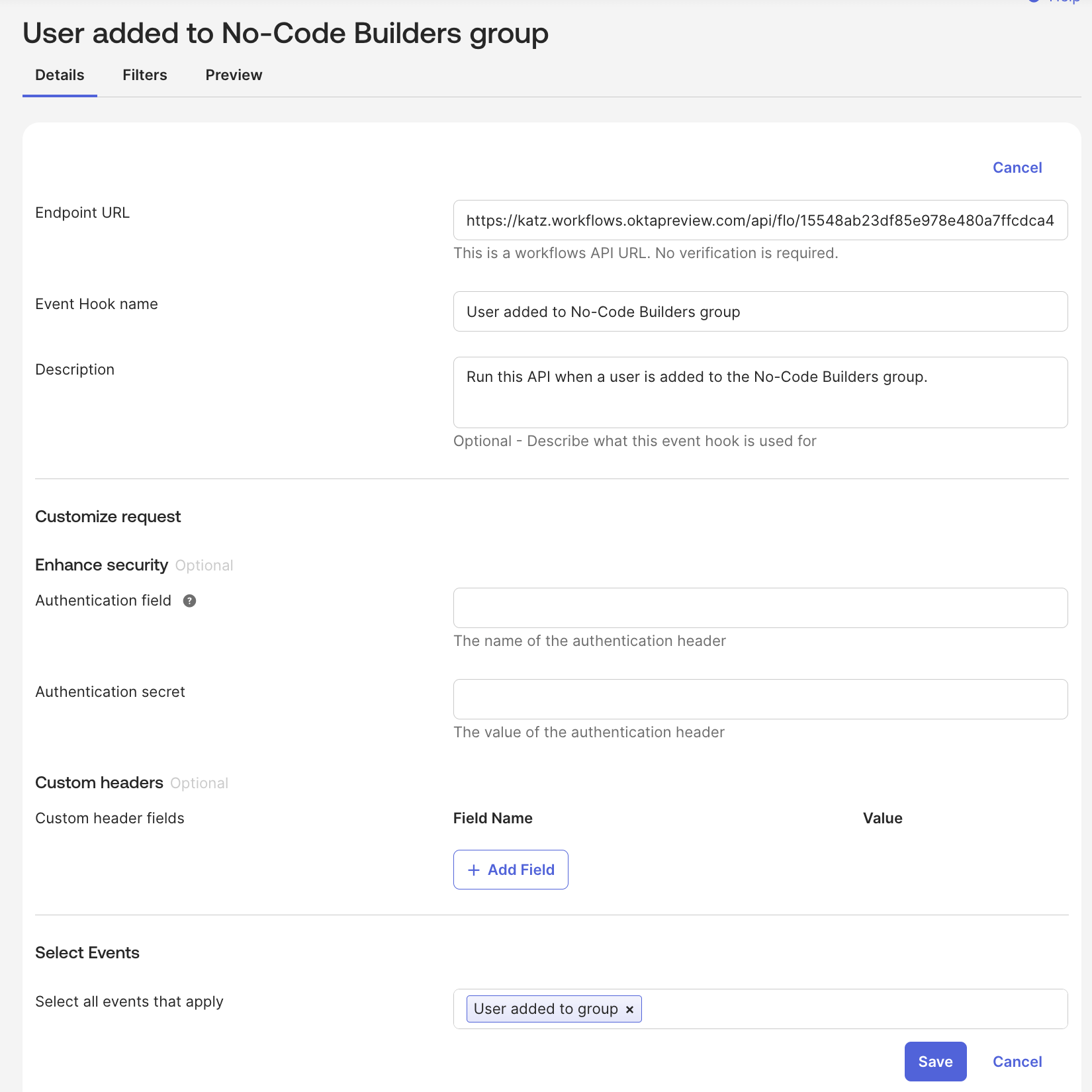
The event hook has a filter to match the group. This prevents the event hook (and flow) from running on any new user added to the group event.

Related Okta Workflows guides
- Okta Workflows Tutorial: Notify When a User is Added to a Group (with Event Hook filtering).
- How to Remove a User from Google Groups When the User Is Deactivated in Okta Workflows.
- How to Remove a User From Groups When the User Is Deactivated.
Okta Workflows resources
🚀 New to Okta Workflows? The Getting Started with Okta Workflows page has all the resources to help you get started.
📺 Like learning from videos? Watch Okta Workflows videos.
❓Have a question? Ask during community office hours, post on the community forum, or email me.
🙋🏻♀️ Want to learn from the community? Join the #okta-workflows channel on the Mac Admins Slack.
📖 Want to learn more about Okta and automation? Take the Okta Workflows training on Okta Learning.
 Max Katz
Leave a comment