In this guide:
- Okta Workflows guides
- List groups and owners for a Okta app
- Related Okta Workflows guides
- Okta Workflows resources
Okta Workflows guides
Okta Workflows guides offer questions and answers from Okta Workflows community office hours. They also come from the #okta-workflows channel on the Mac Admins Slack and other places. Read all the other guides.
How do you create a report listing groups and owners for an Okta app?
This guide teaches you how to create a report in Okta Workflows. For a given application, the report lists all the associated groups and each group’s owner, if one is assigned.
List groups and owners for a Okta app
The report uses two flows:
- A flow to list all app groups.
- A helper flow to list the owner for each group.
A flow to list all app groups
The List app groups flow lists the group assigned to an app:

How the flow works
- The Helper Flow card has an input to enter an app name. This is the app for which you need to list groups and owners.
- The group information and owners are saved in a table. The flow clears the table before each run with the Tables-Clear Table card.
- The Okta-Search Applications card finds extra information about the application.
- The Text-Compose card creates an API endpoint URL for the next card.
- The Okta-Custom API Action card invokes the
/api/v1/apps/ID/groupsendpoint.- The call includes the
expand=groupparameter. This parameter adds group name for each group in the list. - The
parameter _embedded.group.profile.nameholds the group name. - The flow utilizes the Custom API Action cards, as the Okta-Search Groups card doesn’t include group name information.
- The call includes the
- The flow passes the group list to the List-For Each card to process each group and list the group owner.
A helper flow to list the owner for each group
List group owner helper flow:
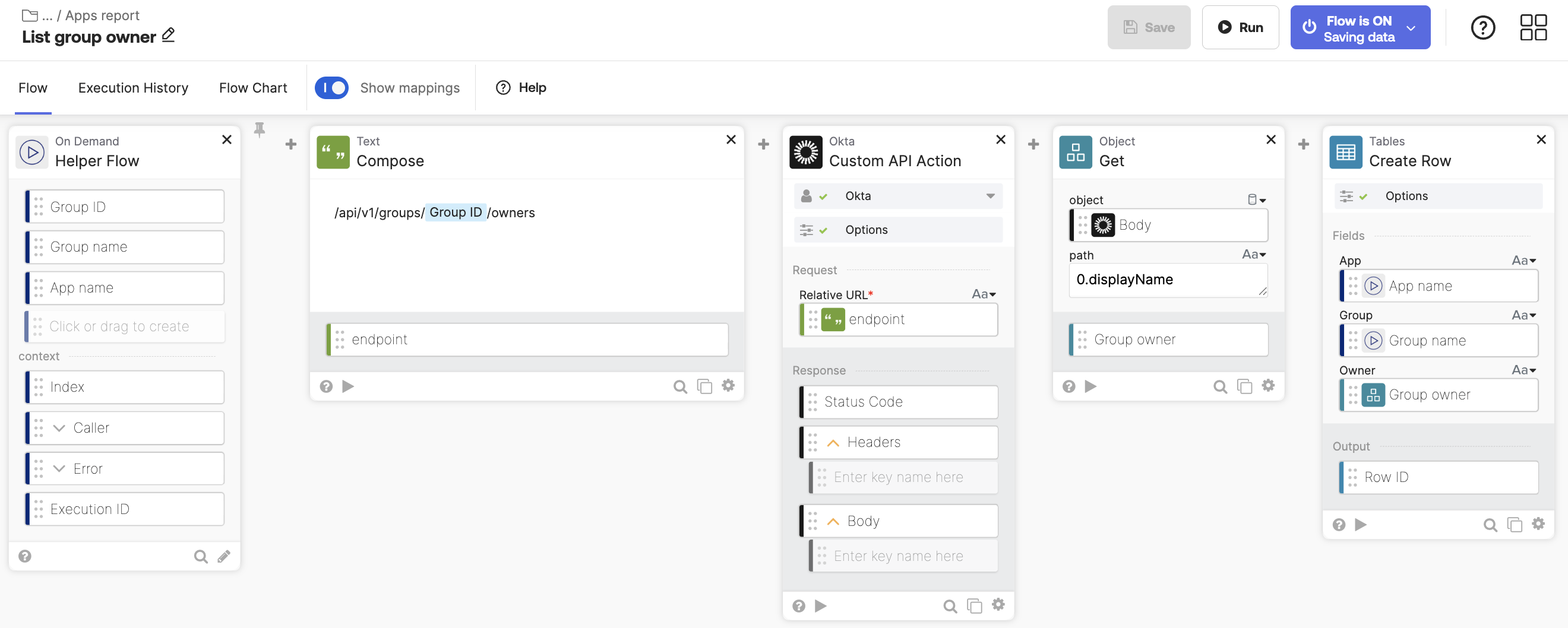
How the flow works
- The main flow passes three fields to the helper flow:
- Group ID
- Group name
- App name
- The Text-Compose card creates an API endpoint to list the group owner.
- The Okta-Custom API Action card invokes the
/api/v1/apps/ID/groupsendpoint to list the group owner. - The Object-Get card retrieves the group name.
- The Tables-Create Row saves information. It creates a table row with App name, Group name, and Group owner (if set).
The table looks like this:

Related Okta Workflows guides
- How to List User’s Direct Reports in Workflows.
- Getting Started with Okta Workflows – Create a Report.
Okta Workflows resources
🚀 New to Okta Workflows? The Getting Started with Okta Workflows page has all the resources to help you get started.
📺 Like learning from videos? Watch Okta Workflows videos.
❓Have a question? Ask during community office hours, post on the community forum, or email me.
🙋🏻♀️ Want to learn from the community? Join the #okta-workflows channel on the Mac Admins Slack.
📖 Want to learn more about Okta and automation? Take the Okta Workflows training on Okta Learning.
 Max Katz
Leave a comment