We recently made Eclipse update site available for Exadel JavaFX plug-in for Eclipse. It’s now easier than ever to install the plug-in. Here is what you need to do.
- Download and install Eclipse IDE 3.5.2 for Java EE Developers.
- In Eclipse, go to Help/Install New Software…
- Click Add
- Enter plug-in name, for example: JavaFX plug-in
- For URL, copy and paste the following URL: http://download.exadel.org/javafx_plugin/updates/release/. This is the latest stable release. If you need the latest nightly release, then use this URL: http://download.exadel.org/javafx_plugin/updates/nightly/
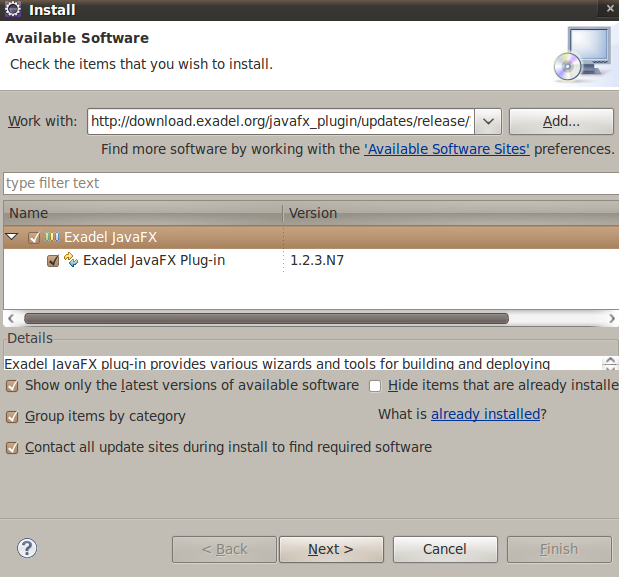
- Click OK. You will see a picture that looks like this:
- Select Exadel JavaFX check box, click Next and finish the installation wizard. You will be prompted with a message to restart Eclipse and you will be ready to go after that.
- Create a project based on JavaFX SDK examples or after creating a new JavaFX project, select File/New/JavaFX Script – you will have an option to generate basic scripts
Any questions or feature requests, please post them to the forum or Jira.


 Max Katz
Leave a reply to max Cancel reply