Okta Workflows Tips are short and handy Workflows tips and tricks. Read all the previous tips.
Set input’s help text (tooltip)
It’s worth mentioning the input field help text (tooltip) feature again. I first wrote about setting an input tooltip in 2022.
You can set custom help text for input fields in cards. This allows you to document how the card works.

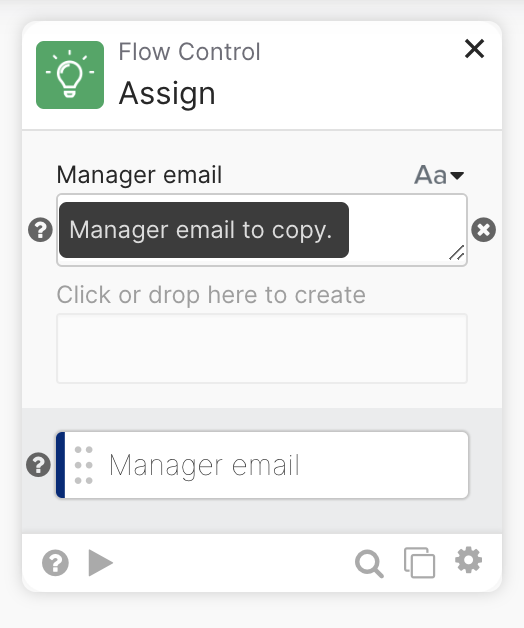
When you place the mouse over the question mark icon, you will see the input field help text:

Go to the field’s Customize option to set the text:
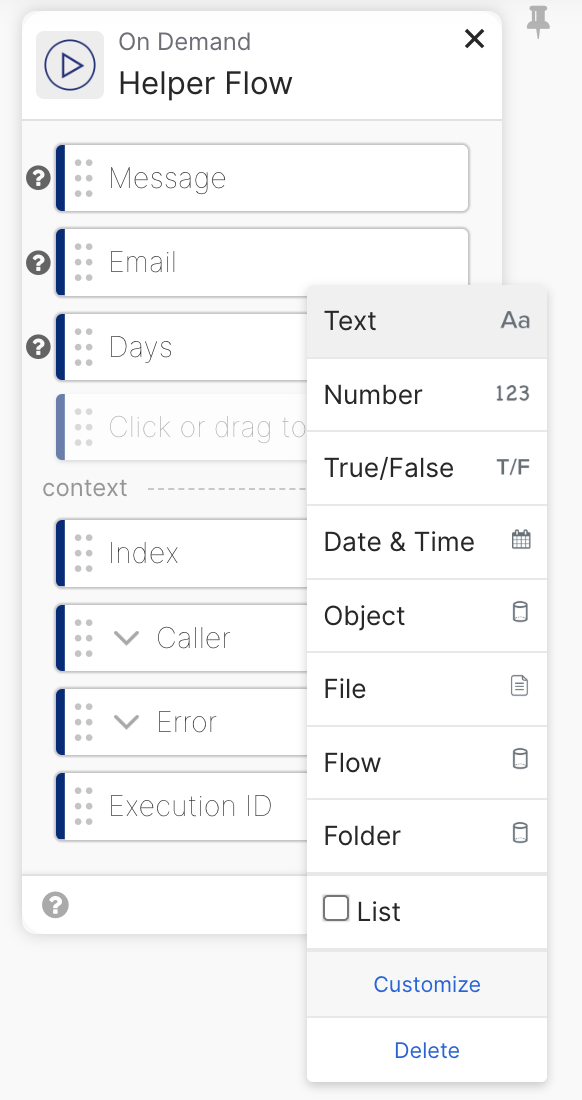
Set the input field help text:

You can set the text help on any card with a custom input. The following example shows the Assign card:
Okta Workflows resources
🚀 New to Okta Workflows? The Getting Started with Okta Workflows page has all the resources to help you get started.
📺 Like learning from videos? Watch Okta Workflows videos.
❓Have a question? Ask during community office hours or post on the community forum.
🙋🏻♀️ Want to learn from the community? Join the #okta-workflows channel on the MacAdmins Slack.
📖 Want to learn more about identity automation? Take Workflows training on Okta Learning.
 Max Katz
Leave a comment