In this guide:
Okta Workflows guides
Okta Workflows guides are questions and answers from the community office hours, the #okta-workflows channel on MacAdmins Slack, and other places. Read all the other guides.
How do you create Okta groups from a CSV file in Okta Workflows?
This guide will teach you how to create groups in Okta from a CSV file using Okta Workflows.
Create Okta groups
The following CSV file has groups you want to create in Okta:
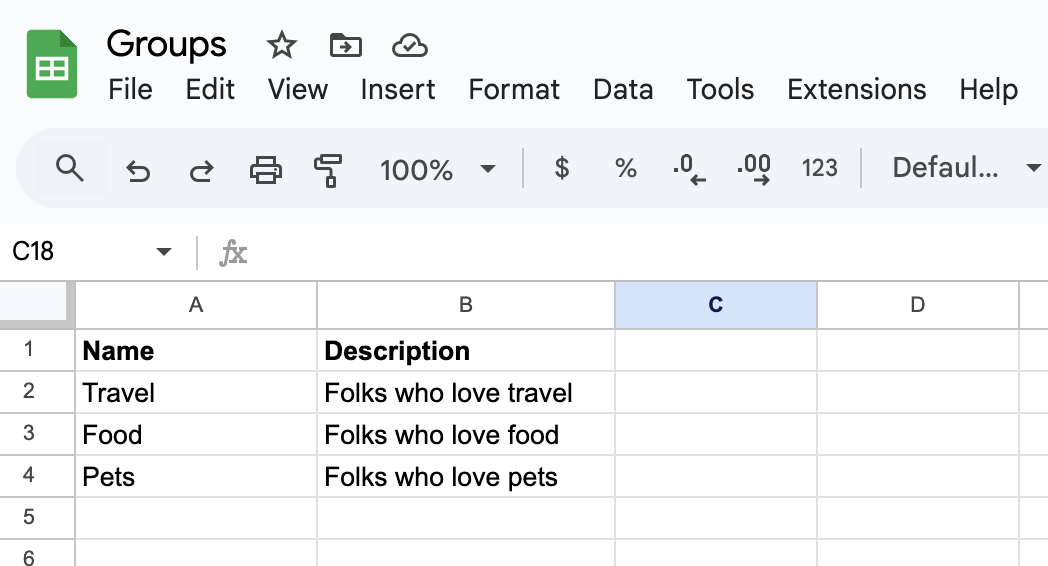
The solution has two flows:
- List groups: a flow to download and load the groups into a Workflows table
- Create group: a flow to create a group
List groups flow
This is the List groups flow:

The flow has the following steps.
- The flow starts with the Tables-Clear Table card to clear the table before each run.
- The Google Drive-Download File downloads the file in a CSV format. You can store the CSV file on any other storage service.
- The Tables-Import from CSV card exports the CSV file to a Workflows table. The table has two columns:
- Name (Text)
- Description (Text)
- The Tables-Search Rows card retrieves all the rows from the table.
- The List-For Each card passes each record (name, description) to a helper flow to create a group.
Create group flow
This flow creates a group:

The flow has the following steps:
- The On Demand-Helper Flow passes the name and description for each group.
- The Okta-Create Group card creates a group.
Running the flow
Running the automation will create three groups:

Create from a table
You can also keep group names directly in a Workflow table without using an external storage service. If so, you won’t need the first three cards in the List groups flow.
Okta Workflows and Okta API limits
Consider Okta Workflows and Okta API limits when creating many Okta groups.
Related Okta Workflows guides
- Save Deactivated Users, Export as CSV, and Email in Okta Workflows
- How to Export Group Membership to a CSV File and Email the File in Okta Workflows
- How to Write Output From the List Users Card to a CSV File
- How to Suspend Multiple Users from a CSV File in Okta Workflows
Okta Workflows resources
🚀 New to Okta Workflows? The Getting Started with Okta Workflows page has all the resources to help you get started.
📺 Like learning from videos? Watch Okta Workflows videos.
❓Have a question? Ask during community office hours, post on the community forum, or email me.
🙋🏻♀️ Want to learn from the community? Join the #okta-workflows channel on the MacAdmins Slack.
📖 Want to learn more about Okta and automation? Take the Okta Workflows training on Okta Learning.
 Max Katz
Leave a comment