In this guide:
Okta Workflows guides
Okta Workflows guides offer questions and answers from Okta Workflows community office hours. They also come from the #okta-workflows channel on the Mac Admins Slack and other places. Read all the other guides.
How to update a profile property for all Okta users using Okta Workflows?
This guide will teach you how to update a profile property for all Okta users using Okta Workflows.
Update all Okta users
There are two flows:
- List users: finds all users to update.
- Update user profile – helper: updates a user profile property for each user.
List users flow
The List users flow finds all users to update:

How the flow works
- The Okta-List Users with Search lists (finds) all the users to update. The card uses the streaming option to send the users to a helper flow.
Update user profile – helper flow
The helper flow updates a user’s profile attribute.
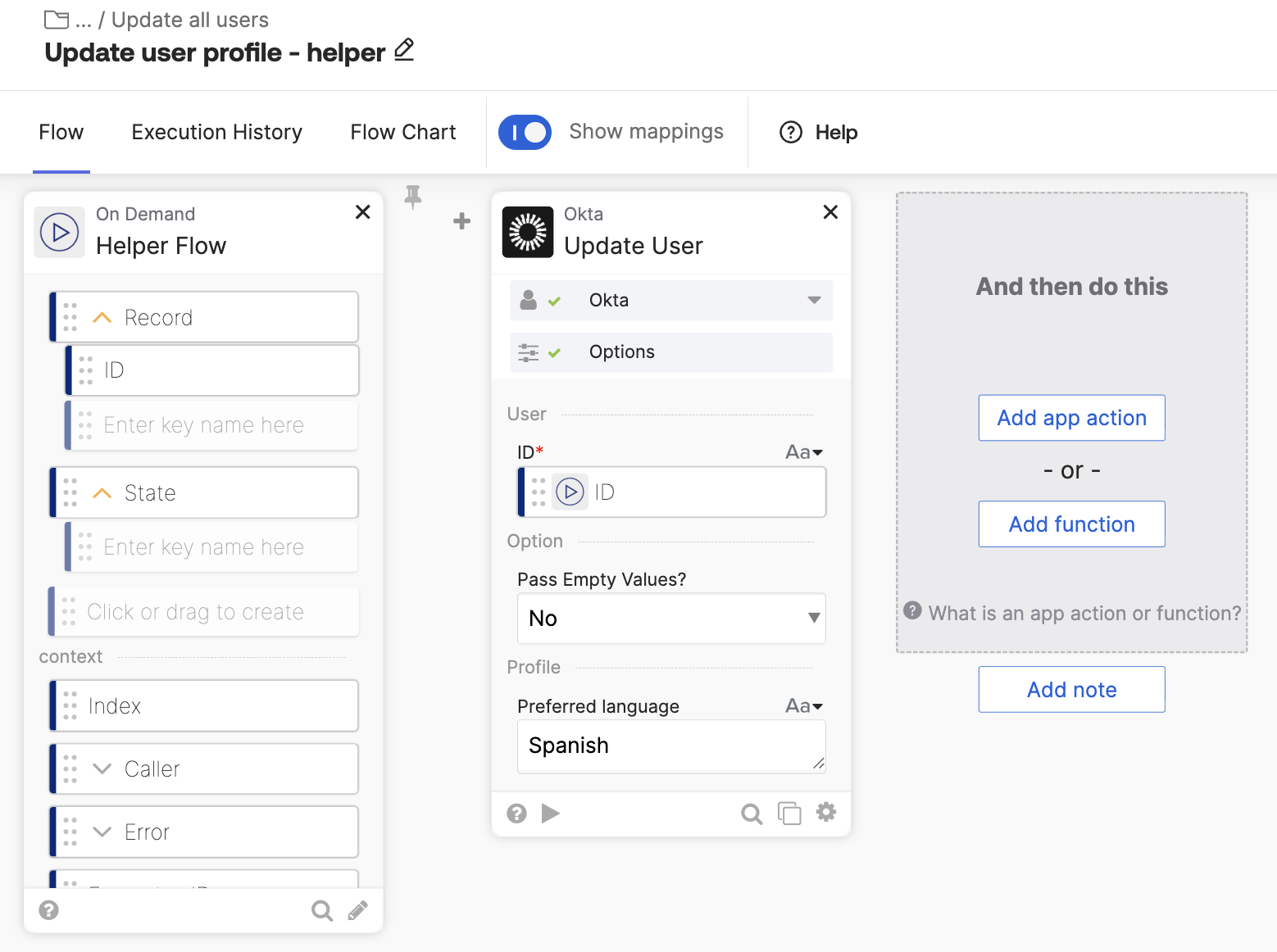
How the flow works
- Since the Helper Flow uses the streaming option, it has two fields: Record and State. The Record field holds the current user and defines the ID field which is the user ID.
- The Okta-Update User card updates a user’s property. This flow updates the Preferred language user profile property. Review the card’s documentation to learn about update options.
Related Okta Workflows guides
- Search for Users Using Contains in Okta Workflows.
- Search for Users using Custom Search Criteria in Okta Workflows.
- How to List User’s Direct Reports in Okta Workflows.
Okta Workflows resources
🚀 New to Okta Workflows? The Getting Started with Okta Workflows page has all the resources to help you get started.
📺 Like learning from videos? Watch Okta Workflows videos.
❓Have a question? Ask during community office hours, post on the community forum, or email me.
🙋🏻♀️ Want to learn from the community? Join the #okta-workflows channel on the Mac Admins Slack.
📖 Want to learn more about Okta and automation? Take the Okta Workflows training on Okta Learning.
 Max Katz
Leave a comment