Welcome to Okta Workflows Tips post. Read all previous tips.
In this post:
- Google Docs connector
- Miro User Management and Miro Administration connectors
- Delete a folder
New Google Docs connector
Workflows has a new Google Docs connector. The connection supports the following actions:
- Create document
- Custom API Action
- Read document
- Update document

Miro Administration and Miro User Management connectors
Workflows has two new Miro connectors:
- Miro Administration – allows enterprise customers to create teams, and manage their team settings and members of the teams
- Miro User Management – allows Miro enterprise customers with SCIM enabled to add users to their organization and manage users’ licenses and statuses
The Miro Adminstration connector has the following actions:
- Create Team
- Search Teams
- Add Member to Team
- Update Team Member Role
- Get Team Settings
- Update Team Sharing Policies Settings
- Update Team Collaboration Settings
- Update Team Discovery Settings
- Update Team Copy Access Settings
The Miro User Management connector has the following actions:
- Create User
- Read User
- Upgrade User License Type to Full
- Update User Status

Delete a folder
Now you can delete a folder that has flows in it (previously the folder had to be empty). When you delete a folder, you will see the following message:
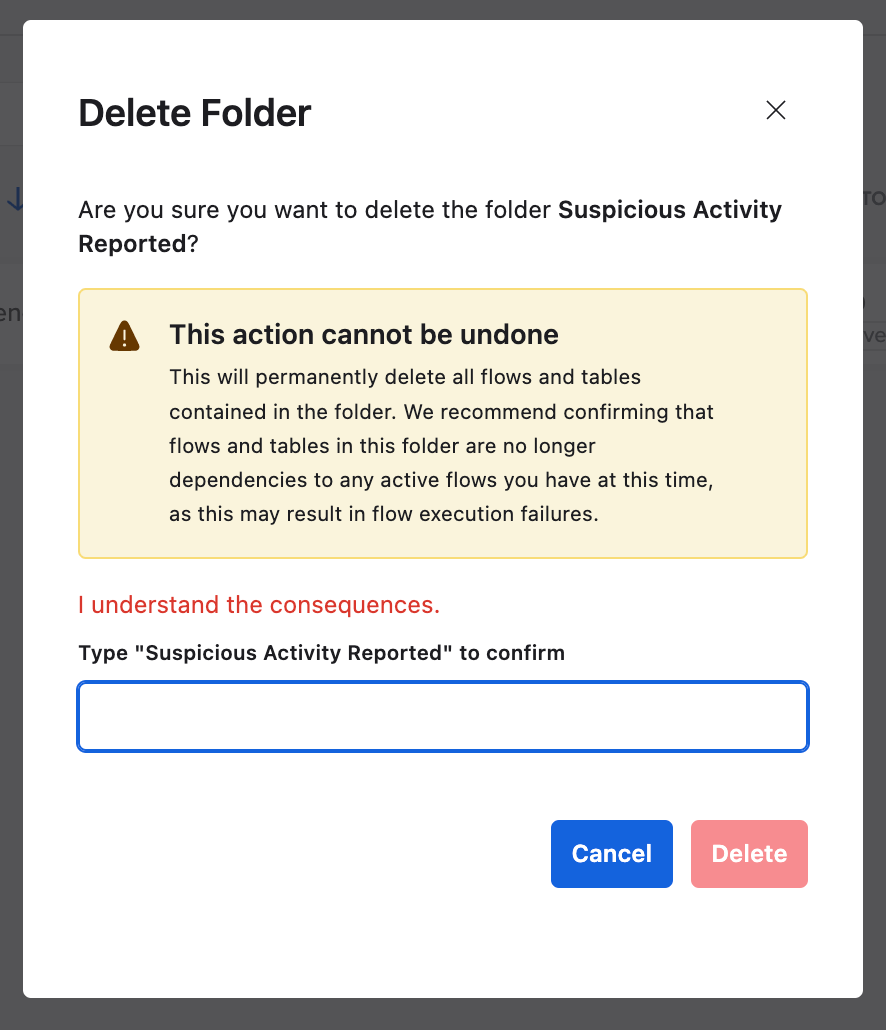
Type the folder name to confirm you want to delete it and click the Delete button. Any active flows in a folder will need to be turned off before you can delete the folder.
More resources to help you learn more:
📇 Join the weekly community office hours to get help.
🎥 Short how-to Workflows videos to help you become a better automation builder.
📘 Read our Workflows How-To Guides based on community member questions.
Leave a Reply