In this guide:
Okta Workflows guides offer questions and answers from the Okta Workflows community office hours. They also come from the #okta-workflows channel on the Mac Admins Slack, as well as other places. Read all the other guides.
How do you remove all users from specific Okta groups on a schedule using Okta Workflows?
This guide will teach you how to remove all users from two Okta groups on a schedule using Okta Workflows.
Remove users from groups on a schedule
This automation removes all members from two specific Okta groups on a recurring schedule. The automation has 3 flows:
- List groups: builds a list of group IDs to process and calls the List group members helper flow for each. In this example, you are removing users from two groups.
- List group members: lists all members of a group and streams each member to the Remove user from group helper flow.
- Remove user from group: removes a single user from the group.
List groups flow
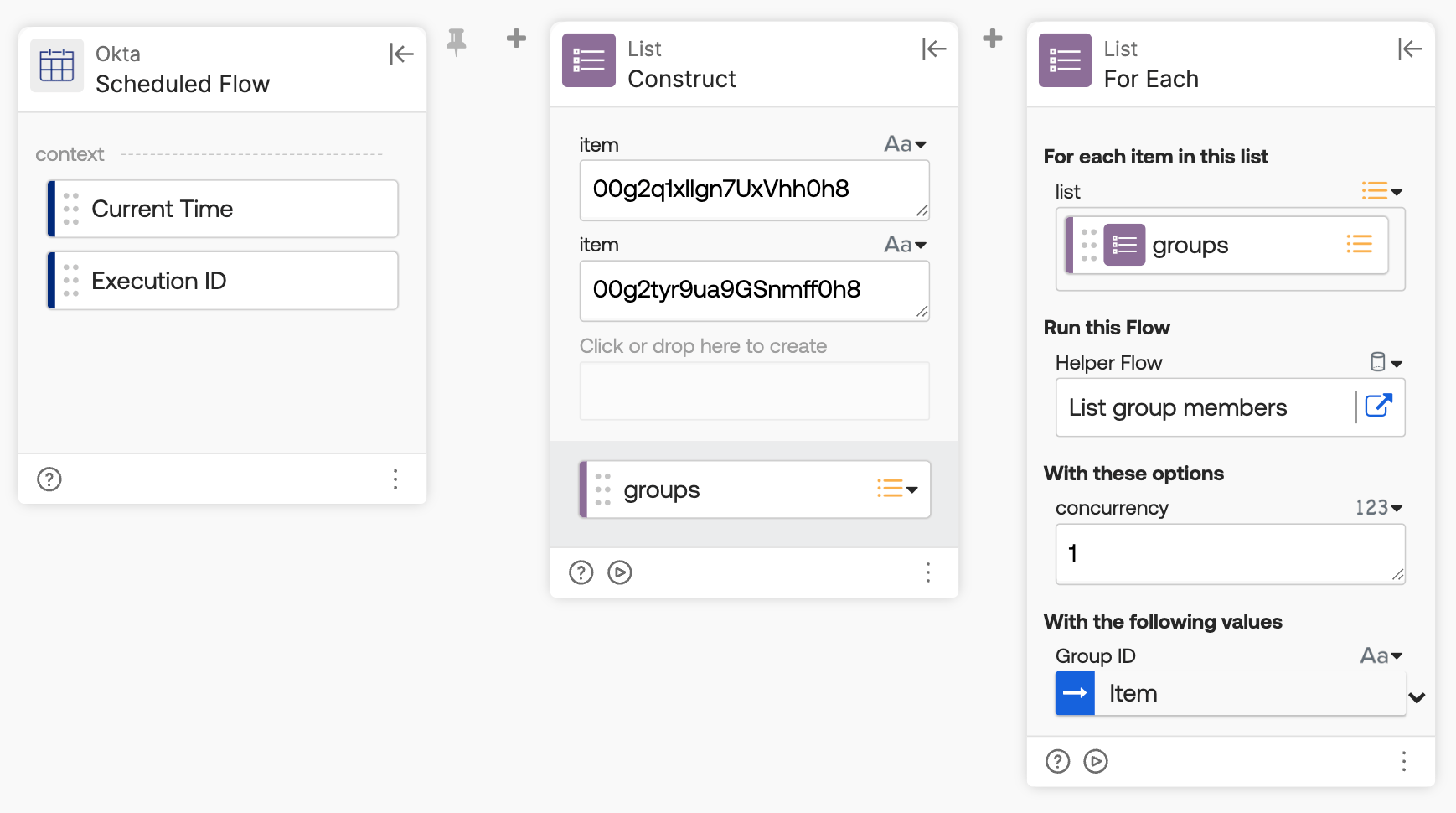
The List groups flow runs on a schedule and kicks off member removal for each group.
How the flow works
- The Okta-Scheduled Flow card triggers the flow on a recurring schedule.
- The List-Construct card creates a list of the two Okta group IDs to process.
- The List-For Each card calls the List group members helper flow for each group ID in the list.
List group members flow
The List group members flow lists all members of a group and streams each one to the removal helper flow.

How the flow works
- The Helper Flow card sets up the Group ID field, passed in from the List groups flow.
- The Okta-List Group Members card lists all group members using the streaming option, passing each member to the Remove user from group helper flow along with the Group ID.
Remove user from group flow
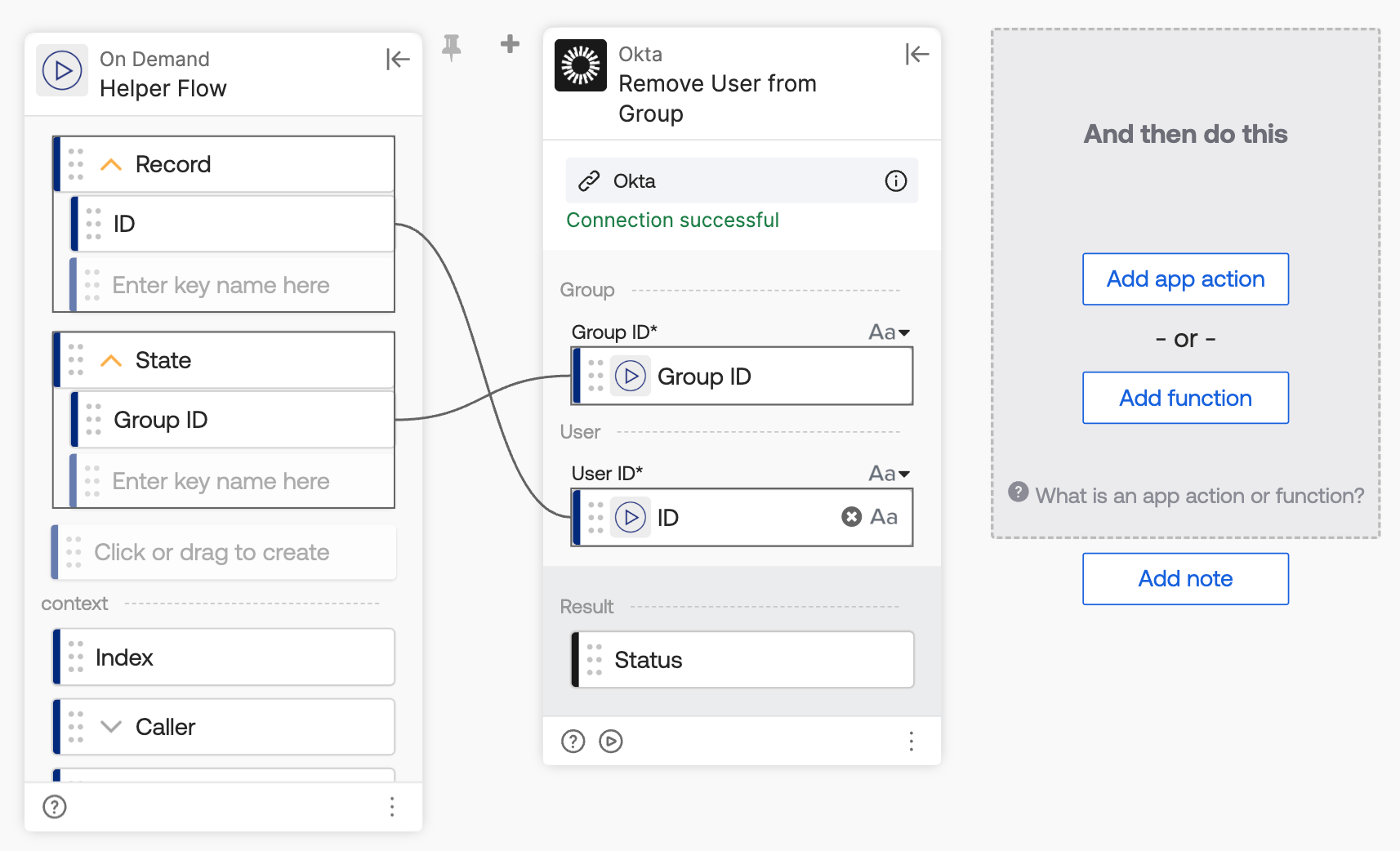
The Remove user from group flow removes a single user from the group.
How the flow works
- Since the main flow uses streaming, the Helper Flow card sets up the Record and State fields.
- Record: holds the object streamed — the full user object. Here, setting up the ID key extracts the user’s ID from that object.
- State: holds the extra field(s) configured on the streaming source card, separate from the record itself. Here, it passes the Group ID into the helper flow.
- The Okta-Remove User from Group card removes the user from the group, using the User ID from Record and the Group ID from State.
Related Okta Workflows guides
- How to Bulk Delete Okta Groups using Okta Workflows
- How to Remove Deactivated Users from All Groups Using Okta Workflows
- Export Okta User Groups to a CSV File and Email It Using Okta Workflows
Okta Workflows resources
- 🚀 New to Okta Workflows? The Getting Started with Okta Workflows page has all the resources to help you get started.
- 📺 Like learning from videos? Watch Okta Workflows videos.
- ❓Have a question? Ask during community office hours or post on the community forum.
- 💬 Want to learn from the community? Join the #okta-workflows channel on the Mac Admins Slack.
- 🎓 Want to learn more about identity automation? Take the Okta Workflows training on Okta Learning.
Leave a Reply