In this guide:
Okta Workflows guides offer questions and answers from the Okta Workflows community office hours. They also come from the #okta-workflows channel on the Mac Admins Slack, as well as other places. Read all the other guides.
How do you find expired SAML app certificates using Okta Workflows?
This guide will teach you how to find expired SAML app certificates using Okta Workflows.
Find expired SAML app certificates
The automation retrieves all SAML apps in your Okta org and checks each app’s certificate expiration date. If the certificate has expired, the flow logs a message with the app name. If the certificate is still valid, the flow stops for that app.
The automation has 2 flows:
- List applications: gets all SAML apps and passes each one to a helper flow.
- Process application: checks the certificate expiration date for one app and logs a message if it has expired.
List applications flow
The List applications flow gets all SAML apps in the org and calls a helper flow for each app.

How the flow works
- The Okta-Custom API Action card sends a GET request to
/api/v1/appswith the filtersignOnMode eq "SAML_2_0". The filter returns only SAML apps. - The List-For Each card goes through the list of apps and calls the Process application helper flow for each one, passing the app ID and label.
Process application flow
The Process application flow checks the certificate expiration date for one app and logs a message if the certificate has expired.
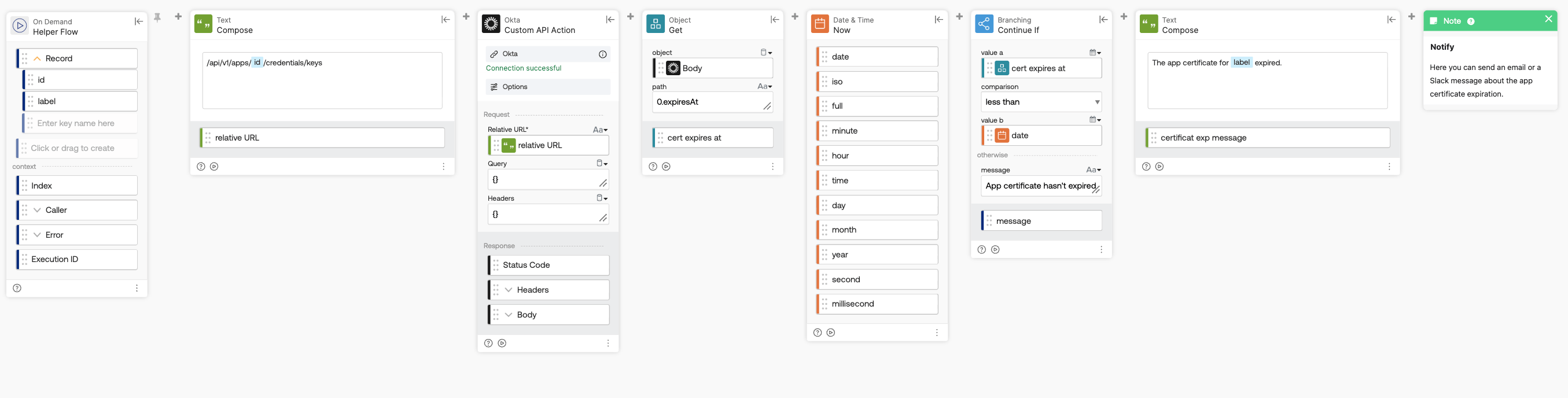
How the flow works
- The Helper Flow card receives the app passed from the List applications flow.
- The Text-Compose card builds the API path
/api/v1/apps/{id}/credentials/keysusing the app ID. This endpoint returns the app’s certificates. - The Okta-Custom API Action card sends a GET request to that path.
- The Object-Get card reads
0.expiresAtfrom the response, which is the expiration date of the first certificate. If an app has more than one certificate, the flow doesn’t check the others. - The Date-Now card returns the current date and time.
- The Branching-Continue If card checks that the expiration date is less than the current date. If the certificate hasn’t expired, the flow stops here with the message App certificate hasn’t expired.
- The Text-Compose card builds the message The app certificate for [app label] expired.
- The Note card records the message.
Related Okta Workflows guides
- How to Call an API When It’s Not Available From an Existing Card (Connection)
- How to Setup a Workflows Helper Flow (With For-Each and Streaming Cards)
Okta Workflows resources
- 🚀 New to Okta Workflows? The Getting Started with Okta Workflows page has all the resources to help you get started.
- 📺 Like learning from videos? Watch Okta Workflows videos.
- ❓Have a question? Ask during community office hours or post on the community forum.
- 💬 Want to learn from the community? Join the #okta-workflows channel on the Mac Admins Slack.
- 🎓 Want to learn more about identity automation? Take the Okta Workflows training on Okta Learning.
Leave a Reply