In this guide:
Okta Workflows guides
Okta Workflows guides offer questions and answers from the Okta Workflows community office hours. They also come from the #okta-workflows channel on the Mac Admins Slack and other places. Read all the other guides.
How do you create a group membership report and email it using Okta Workflows?
This guide will teach how to create a group membership report. The guide will show how to export group membership to a CSV file and email it using Okta Workflows.
Group membership report
This automation lists all members of an Okta group, saves them to a table, exports the table to a CSV file, and emails the file as an attachment. The automation has 2 flows:
- List group members: lists all members of a group, exports them to a CSV file, and emails the file.
- Save to table: saves each group member to the table as the main flow streams results.
An older version of this guide, which uses For Each instead of streaming.
Flow 1: List group members
The List group members flow lists all members of a specified Okta group, exports them to a CSV file, and sends the file via email.

How the flow works
- The Table-Clear Table card clears all rows from the table before each run, so it only contains current members.
- The Flow Control-Assign card stores the Group ID for the group whose members you want to export.
- The Okta-List Group Members card lists all group members using the streaming option, passing each member to the Save to table helper flow.
- The Okta-Read Group card reads the group details to retrieve the group name.
- The Text-Concatenate card combines the group name with _members.csv to build the CSV filename.
- The Table-Export to CSV card exports all rows from the table to a CSV file.
- The Gmail-Send Email with Attachment card sends an email with the CSV file attached.
Flow 2: Save to table
The Save to table flow saves each group member’s details as a row in the table.
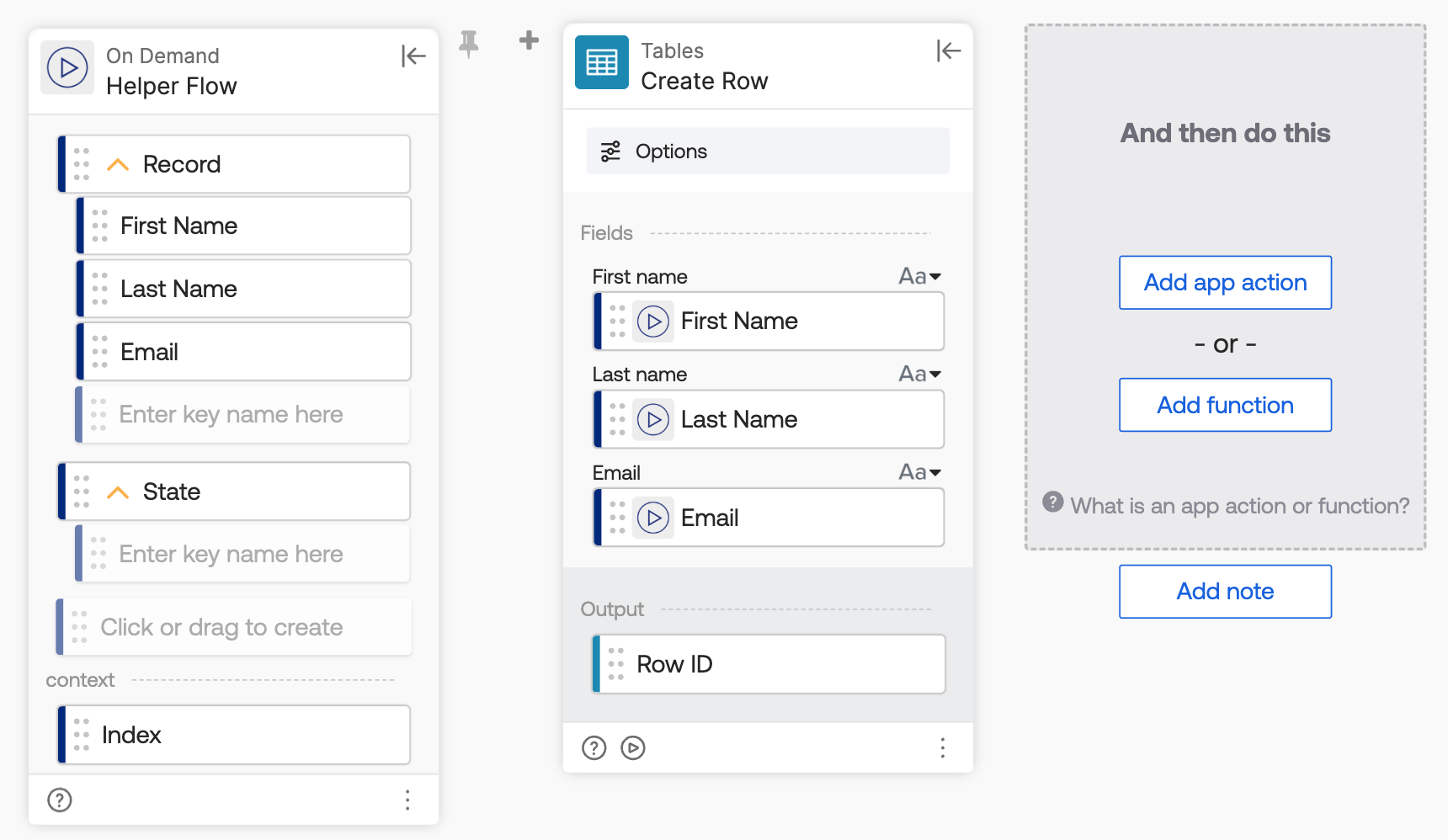
How the flow works
- Since the main flow uses streaming, the Helper Flow sets up the Record and State fields. The Record contains each group member’s First Name, Last Name, and Email.
- The Table-Create Row card creates a new row in the table with the member’s First Name, Last Name, and Email.
Email with attached report
The email with the attached report looks like this:

Download the flow
Related Okta Workflows guides
- Export Okta User Groups to a CSV File and Email It Using Okta Workflows.
- Create a Report Listing Groups and Owners for an Okta App in Okta Workflows.
- How to List User’s Direct Reports in Okta Workflows.
Okta Workflows resources
- 🚀 New to Okta Workflows? The Getting Started with Okta Workflows page has all the resources to help you get started.
- 📺 Like learning from videos? Watch Okta Workflows videos.
- ❓Have a question? Ask during community office hours or post on the community forum.
- 💬 Want to learn from the community? Join the #okta-workflows channel on the Mac Admins Slack.
- 🎓 Want to learn more about identity automation? Take the Okta Workflows training on Okta Learning.
Leave a Reply