In this guide:
Okta Workflows guides offer questions and answers from the Okta Workflows community office hours. They also come from the #okta-workflows channel on the Mac Admins Slack, as well as other places. Read all the other guides.
How do you build an API request body using output from previous cards in Okta Workflows?
This guide will teach you how to build an API request body using output from previous cards in Okta Workflows.
The guide will use the Postman Echo API for demonstration.
Get request
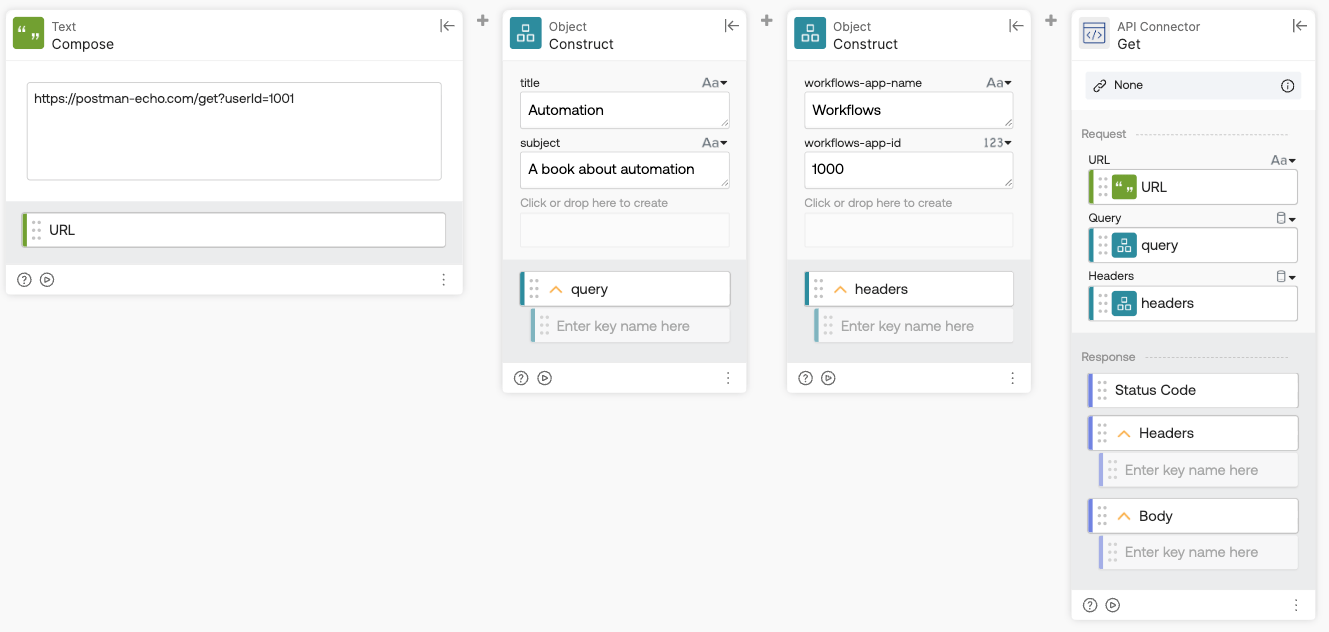
This flow shows how to build a GET request using output from previous cards — combining a URL, query parameters, and headers into the API Connector-Get card. Unlike the POST example, a GET request doesn’t include a body.
How the flow works
- The Text-Compose card creates the request URL:
https://postman-echo.com/get?userId=1001. - The first Object-Construct card builds the query parameters — an object with the following fields:
- title=Automation
- subject=A book about automation
- The second Object-Construct card builds the request headers — an object with:
- workflows-app-name=Workflows
- workflows-app-id=1000
- The API Connector-Get card sends the GET request, using the URL from the Text-Compose card and the query and headers objects from the two Object-Construct cards.
Output
When you run the flow and make a request to the Postman API, Postman returns (echoes) the data it received. The API Connector-Get card Body field returns the following:
{ "args": { "userId": "1001", "subject": "A book about automation", "title": "Automation" }, "headers": { "host": "postman-echo.com", "workflows-app-name": "Workflows", "user-agent": "Azuqua", "workflows-app-id": "1000", "x-forwarded-proto": "https", "accept-encoding": "gzip, br" }, "url": "https://postman-echo.com/get?userId=1001&subject=A%20book%20about%20automation&title=Automation"}
- The args object shows the query parameters — combining the userId from the Text-Compose URL with the subject and title from the query object.
- You can see the workflows-app-name and workflows-app-id values in the headers object.
- The url field shows all three query parameters appended to the request URL.
Post request
JSON body flow
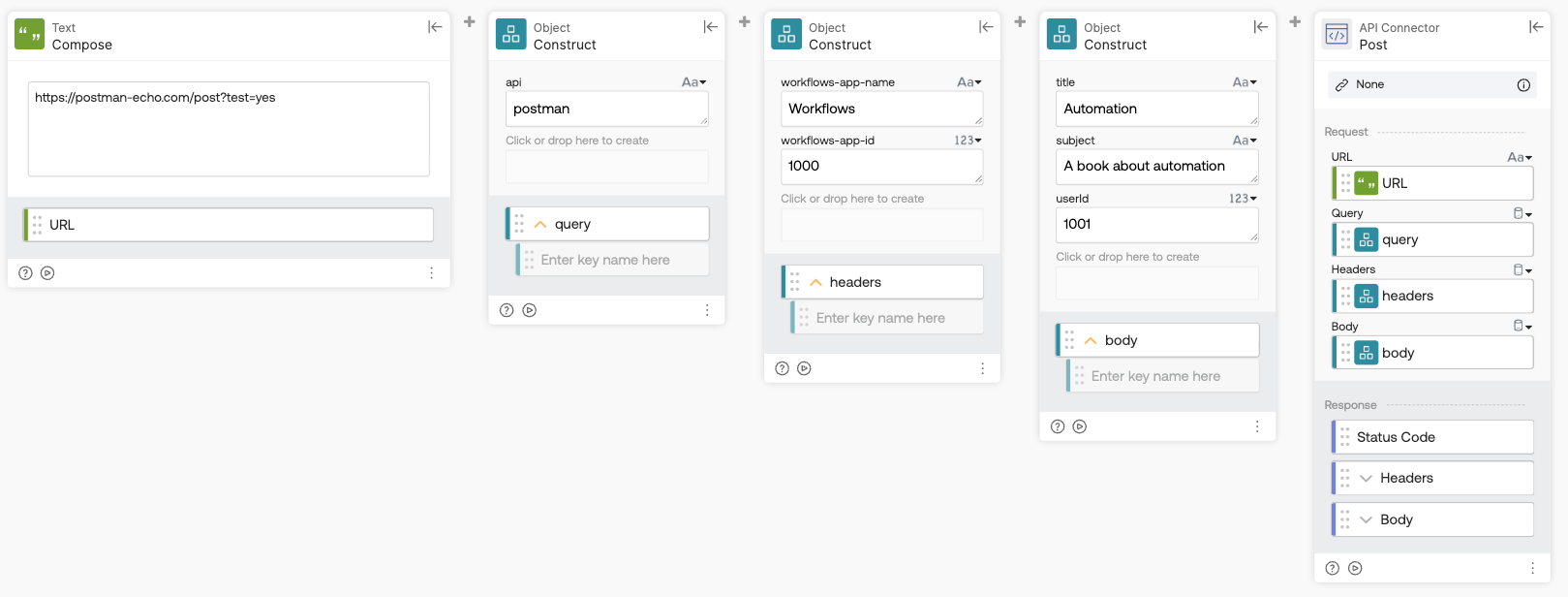
This flow shows how to make a POST request. The flow uses cards to create the URL, query, headers, and body fields for the request.
How the flow works
- The Text-Compose card creates the request URL:
https://postman-echo.com/post?test=yes - The first Object-Construct card builds the query parameters — an object with:
- api=postman
- The second Object-Construct card builds the request headers — an object with:
- workflows-app-name=Workflows
- workflows-app-id=1000
- The third Object-Construct card builds the request body — an object with:
- title=Automation
- subject=A book about automation
- userId=1001
- The API Connector-Post card sends a POST request to the URL from the Text-Compose card, using the body, headers, and query objects from the three Object-Construct cards.
Output
When you run the flow and make a request to the Postman API, Postman returns (echoes) the data it received. The API Connector-Post card Body field returns the following:
{ "args": { "test": "yes", "api": "postman" }, "data": { "subject": "A book about automation", "title": "Automation", "userId": 1001 }, "files": {}, "form": {}, "headers": { "host": "postman-echo.com", "content-length": "72", "workflows-app-id": "1000", "content-type": "application/json", "user-agent": "Azuqua", "workflows-app-name": "Workflows", "x-forwarded-proto": "https", "accept-encoding": "gzip, br" }, "json": { "subject": "A book about automation", "title": "Automation", "userId": 1001 }, "url": "https://postman-echo.com/post?test=yes&api=postman"}
- The args JSON object shows the query parameters
- The data object shows the body parameters
- You can see the workflows-app-name and workflows-app-id values in the headers object.
- The url field shows the query parameters appended to the request URL — test=yes from the Text-Compose URL and api=postman from the query object.
URL-encoded body flow
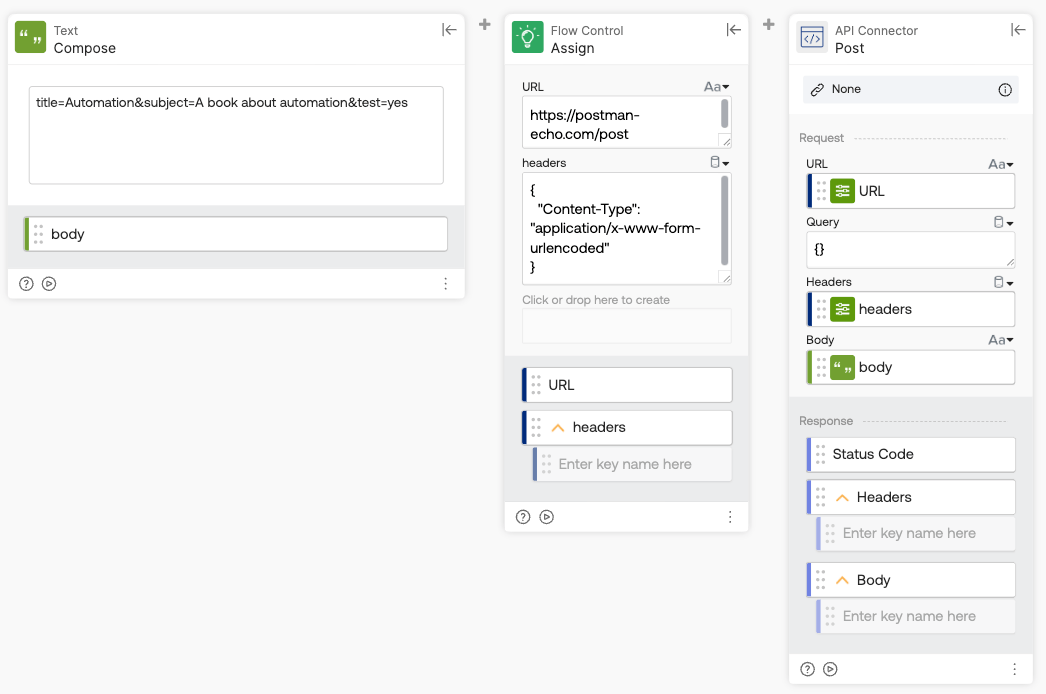
The URL-encoded body flow sends a POST request with the body encoded as a key=value&key=value string instead of a JSON object. The Content-Type header is explicitly set to application/x-www-form-urlencoded so that Postman Echo parses the body correctly.
How the flow works
- The Text-Compose card creates the request body as a URL-encoded string:
title=Automation&subject=A book about automation&test=yes. - The Flow Control-Assign card sets the request URL to
https://postman-echo.com/postand the headers to{"Content-Type": "application/x-www-form-urlencoded"}. - The API Connector-Post card sends a POST request using the URL and headers from the Flow Control-Assign card and the body from the Text-Compose card.
Output
When you run the flow and make a request to the Postman API, Postman returns (echoes) the data it received. The API Connector-Post card Body field returns the following:
{ "args": {}, "data": "", "files": {}, "form": { "title": "Automation", "subject": "A book about automation", "test": "yes" }, "headers": { "host": "postman-echo.com", "content-length": "57", "user-agent": "Azuqua", "content-type": "application/x-www-form-urlencoded", "x-forwarded-proto": "https", "accept-encoding": "gzip, br" }, "json": { "title": "Automation", "subject": "A book about automation", "test": "yes" }, "url": "https://postman-echo.com/post"}
- The form object shows the parsed body parameters (title, subject, test) — this is where Postman Echo puts URL-encoded body data, unlike the JSON example, where it showed up in data.
- The content-type header confirms that the request was sent as
application/x-www-form-urlencoded. - The args object is empty since this flow doesn’t send any query parameters.
Download the flow
Related Okta Workflows guides
- Understanding Okta Workflows Connectors
- Okta Workflows Guide Collection: Calling APIs
- Four Ways to Call an API in Okta Workflows
Okta Workflows resources
- 🚀 New to Okta Workflows? The Getting Started with Okta Workflows page has all the resources to help you get started.
- 📺 Like learning from videos? Watch Okta Workflows videos.
- ❓Have a question? Ask during community office hours or post on the community forum.
- 💬 Want to learn from the community? Join the #okta-workflows channel on the Mac Admins Slack.
- 🎓 Want to learn more about identity automation? Take the Okta Workflows training on Okta Learning.
Leave a Reply